

PlanMaker NORM.INV Function: Convert a normal probability to a percentile
Use NORM.INV and legacy NORMINV in PlanMaker to calculate normal quantiles, with probability checks and numerical limitations.
Verification status: See the evidence and test scope described in this guide. How formula examples are checked
Quick answer: =NORM.INV(0.975,10,2) is mathematically approximately 13.9199279691. It is the 97.5th percentile of a normal model with mean 10 and standard deviation 2. PlanMaker’s documented inverse accuracy is expressed in probability space, so the displayed quantile need not match every digit of that independent reference.
Syntax and probability direction
=NORM.INV(Probability, Mean, StdDev)
=NORMINV(Probability, Mean, StdDev)
All three arguments are required. Probability is the cumulative area to the left of the answer. Mean is the arithmetic mean on the original scale, and StdDev is a strictly positive standard deviation on that scale. It is not a variance and not a logarithmic standard deviation.
Use an interior probability 0<p<1 for finite quantiles. The help describes a range 0 to 1, but the mathematical inverse tends to negative or positive infinity at the endpoints. Do not infer usable finite endpoint behavior from that wording; in the tested build, =NORM.INV(0,10,2) and =NORM.INV(1,10,2) both return #NUM!.
For a 5% upper-tail cutoff, use p=0.95, not 0.05. A central 95% interval uses the two left-tail probabilities 0.025 and 0.975.
Reproduce the median and two cutoffs
Enter 0.975 in B2, 10 in B3, and 2 in B4. In B6 enter =NORM.INV(B2,B3,B4). Compare its output with the independent mathematical value 13.9199279691, allowing for the numerical tolerance discussed below.
| Formula | Independent mathematical quantile |
|---|---|
=NORM.INV(0.5,10,2) |
10 |
=NORM.INV(0.975,10,2) |
13.9199279691 |
=NORM.INV(0.025,10,2) |
6.0800720309 |
The calculation is x=Mean+StdDev×z, where z is the standard normal quantile. At p=0.975, z≈1.9599639845, so x≈10+2×1.9599639845. The median is the mean for a normal distribution, providing an especially simple check of location and scale.
Documented precision and a useful residual check
The official help describes an iterative calculation with at most 100 iterations. It says a result must get within approximately ±3×10⁻⁷ of Probability, otherwise PlanMaker returns #N/A after the iteration limit.
That statement is about the CDF evaluated at the candidate answer. It is not a promise of 3×10⁻⁷ error in the quantile x, and it is not a machine-precision guarantee. When the density at the quantile is small, a small probability difference can correspond to a larger change in x.
To examine the probability residual for the example, use:
=NORM.DIST(NORM.INV(0.975,10,2),10,2,TRUE)
Compare this with 0.975. A separately calculated mathematical CDF at the actual returned quantile is also useful because a native forward/inverse pair can share numerical limitations. Do not round the intermediate quantile before checking it. The examples use moderate probabilities rather than claiming extreme-tail accuracy.
Practical use: a central model interval
The 2.5th and 97.5th percentiles give the independent interval [6.0800720309,13.9199279691] for this specified normal distribution. This is a central probability interval for the modeled variable. It is not automatically a confidence interval for an estimated mean or a guarantee that future observations remain inside it.
If the variable’s mean changes from 10 to 20 while the standard deviation remains 2, every quantile shifts by 10. If the standard deviation doubles, each quantile’s deviation from the mean doubles. This gives a practical check for accidentally supplying a variance or mixing measurement units.
The function does not estimate parameters, fit a distribution, or determine whether a normal model is appropriate. Keep the chosen mean, standard deviation, probability, and interpretation visible beside the result.
Errors, aliases, and compatibility
A zero standard deviation violates the documented StdDev>0 condition. The tested endpoint cases and =NORM.INV(0.5,10,0) all return #NUM! in this build. The documented #N/A iteration failure must not be confused with every possible input error.
The official NORMINV reference calls NORM.INV identical. Paired median and 97.5th-percentile formulas use both spellings; legacy does not mean retired. The Excel 2010 note describes compatibility of the dotted spelling, not a PlanMaker introduction date.
NORM.DIST provides the forward CDF; NORM.S.INV supplies z before scaling. LOGNORM.INV uses a different, log-space model. Use the formula separators accepted by your installed locale.
Native results and displayed precision
The tested median formula returned 9.99999970197678, displayed as 10, rather than an exact mathematical 10. The 0.975 quantile returned approximately 13.9199277758598, and the 0.025 quantile approximately 6.08007222414017. Their independently evaluated normal-CDF residuals are within the documented 3×10⁻⁷ probability-space tolerance. The matching NORMINV calls returned the same saved values.
The nested native CDF check returned approximately 0.974999994353613, close to the target 0.975. The displayed rounding should not be mistaken for exact raw equality.
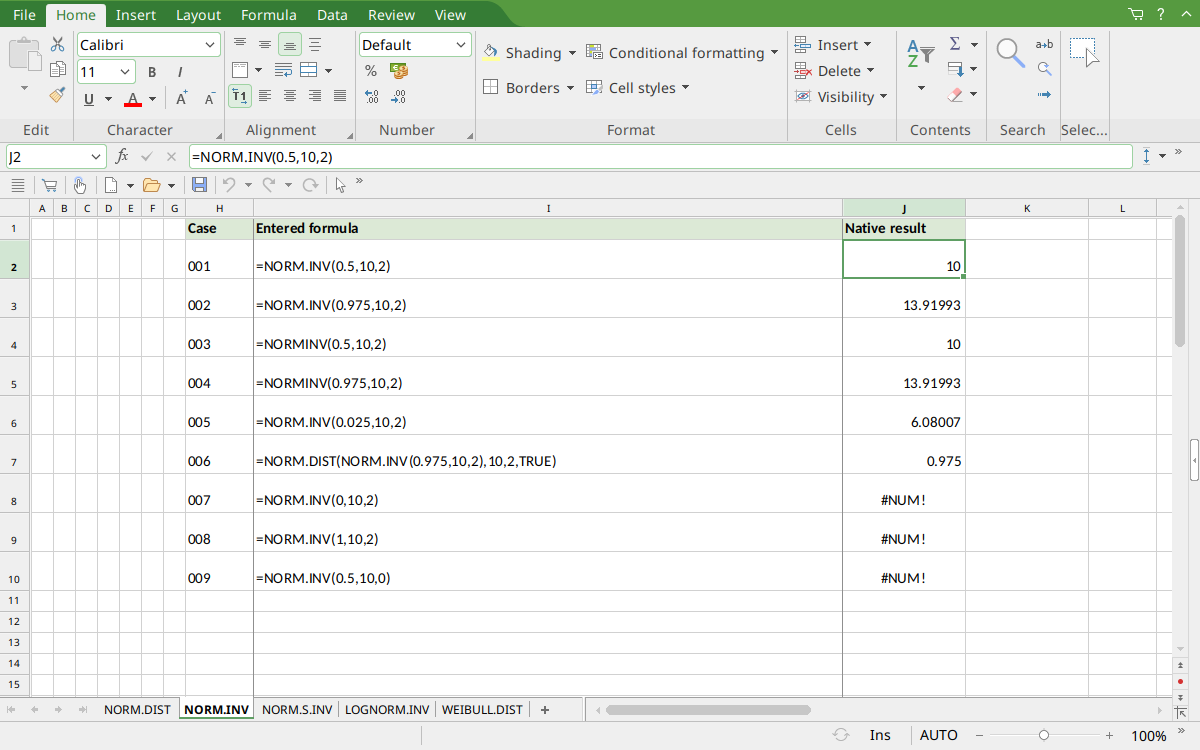
FreeOffice PlanMaker 2024 rev F1238.1005: selected cell J2 contains =NORM.INV(0.5,10,2) and displays 10. The saved numeric results retain more digits than the screenshot display; the mathematical references and native approximations are distinguished above.
Version and evidence scope
Official FreeOffice PlanMaker 2024 references checked October 18, 2026: reference 1, reference 2. The first PlanMaker introduction release is unknown from these references. Documentation and the Excel compatibility note do not establish support in every edition or imply retirement of a legacy spelling.
The 9 selected formula cells for this function were tested on October 18, 2026 in FreeOffice PlanMaker 2024 rev F1238.1005, 64-bit, saved in native PMDX format, and reopened with their calculation meaning preserved. Paired legacy calls were included. Native results remain distinct from independent mathematical references, cell-reference teaching layouts, and advanced interval examples that were not each separately executed. The proprietary implementation has not been inspected; these bounded observations do not establish every tail, input type, edition, or export behavior.