

PlanMaker NORM.S.INV Function: Find standard normal quantiles
Use NORM.S.INV and legacy NORMSINV in PlanMaker for standard-normal quantiles, including inverse tolerance and endpoint cautions.
Verification status: See the evidence and test scope described in this guide. How formula examples are checked
Quick answer: =NORM.S.INV(0.975) is mathematically approximately 1.9599639845. The answer is a z-value with 97.5% of the standard normal distribution to its left. It is not a 97.5% probability expressed in another format.
Syntax and meaning
=NORM.S.INV(Probability)
=NORMSINV(Probability)
There is one required argument. The standard normal distribution has mean 0 and standard deviation 1, so no location or scale arguments are supplied. Probability is a left-tail cumulative probability.
For finite values, use 0<p<1. Although the short help uses inclusive wording “0 to 1,” the mathematical inverse at the endpoints is unbounded. In the tested build, =NORM.S.INV(0) and =NORM.S.INV(1) both return #NUM!, rather than a finite endpoint quantile.
A negative z-value lies below the standard normal mean. A positive z-value lies above it. If the desired area is in the upper tail, first convert it to a cumulative left-tail area. For an upper-tail area of 0.025, p=0.975 and the quantile is positive.
Build a three-row quantile table
Put the following probabilities in A2:A4 and enter =NORM.S.INV(A2) in B2, then fill down:
| Probability | Independent mathematical z-value |
|---|---|
| 0.025 | -1.9599639845 |
| 0.5 | 0 |
| 0.975 | 1.9599639845 |
These follow standard normal symmetry: the median is 0 and complementary probabilities give opposite quantiles. The listed digits are mathematical reference values, not a promise that the installed program returns all digits exactly.
The legacy forms =NORMSINV(0.5) and =NORMSINV(0.975) provide paired spelling checks. A single literal argument supplies a probability, not an observed measurement or a list of data to standardize.
Respect probability-space accuracy
The official reference says the inverse uses iteration, allowing up to 100 steps to achieve a deviation of less than approximately ±3×10⁻⁷ in Probability. If it cannot, the documented result is #N/A.
The tolerance is measured after mapping the returned z-value back through the normal CDF. It does not promise an absolute z-error of 3×10⁻⁷. In a tail, the density is small, so an allowed probability residual may correspond to a visibly larger z difference.
A bounded worksheet check is:
=NORM.DIST(NORM.S.INV(0.975),0,1,TRUE)
The mathematical target is 0.975. Keep the unrounded inverse result for the check; rounding a z-value to 1.96 first changes the probability. An independent CDF evaluation at the raw returned z helps distinguish native round-trip agreement from broader numerical accuracy.
Practical use: transform a percentile to original units
Suppose a model has mean 10 and standard deviation 2. Convert its 97.5th-percentile z-value to the original scale with:
=10+2*NORM.S.INV(0.975)
The independent result is approximately 13.9199279691. The corresponding lower central 95% endpoint is approximately 6.0800720309. NORM.INV performs this location-and-scale operation directly.
The z-value is unitless; the scaled result has the units of the modeled variable. This percentile transformation is not automatically a confidence interval for an estimated parameter. If you intend a confidence procedure, its sampling assumptions and standard error require a separate derivation.
Do not feed a raw value such as 12 into NORM.S.INV to “normalize” it. To standardize an observation, calculate (x−mean)/SD. The inverse function instead maps a probability into a threshold.
Errors and compatibility limits
The tested p=0 and p=1 calls return #NUM!; that finding is scoped to this build and these exact calls. The iteration-limit #N/A is documented but not guaranteed to be the response to every invalid input.
The official NORMSINV page identifies NORM.S.INV as identical. It does not declare the legacy name deprecated or retired. The help mentions Excel 2010 for the dotted spelling; that does not establish the first PlanMaker release supporting either name.
Use NORM.DIST for a normal CDF or density and NORM.INV for a nonstandard location and scale. Follow the argument and decimal separators of your locale. Moderate verified probabilities do not establish extreme-tail accuracy or identical behavior in another version.
Native results and displayed precision
The native median is close to zero, not exactly zero: =NORM.S.INV(0.5) returned -1.49011611938477×10⁻⁷ in this build. Its independent normal-CDF residual is approximately 5.9447×10⁻⁸, inside the documented 3×10⁻⁷ probability tolerance. The matching NORMSINV call returned the same nonzero value.
At 0.975 the native quantile is approximately 1.95996388792992; at 0.025 it is approximately -1.95996388792992. The mathematical table above remains the reference, while these are the actual native approximations. The native nested CDF check gives approximately 0.974999994353613.
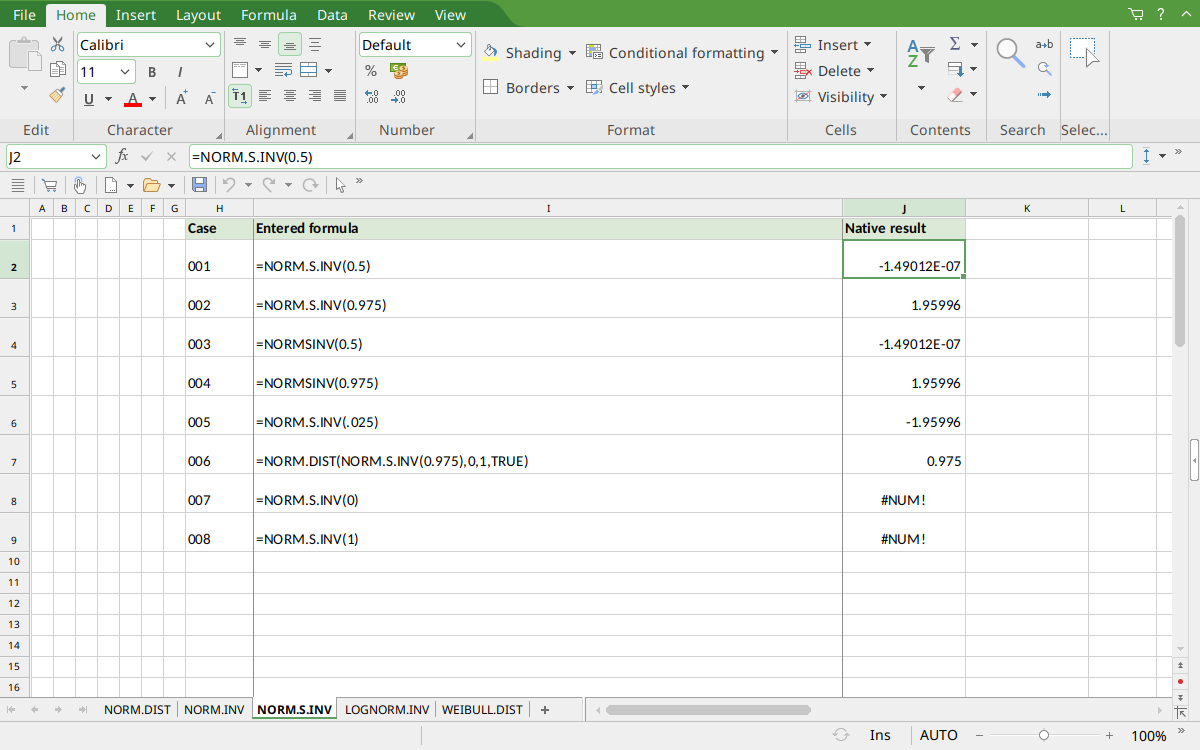
FreeOffice PlanMaker 2024 rev F1238.1005: selected cell J2 contains =NORM.S.INV(0.5) and displays -1.49012E-07. The saved numeric results retain more digits than the screenshot display; the mathematical references and native approximations are distinguished above.
Version and evidence scope
Official FreeOffice PlanMaker 2024 references checked October 18, 2026: reference 1, reference 2. The first PlanMaker introduction release is unknown from these references. Documentation and the Excel compatibility note do not establish support in every edition or imply retirement of a legacy spelling.
The 8 selected formula cells for this function were tested on October 18, 2026 in FreeOffice PlanMaker 2024 rev F1238.1005, 64-bit, saved in native PMDX format, and reopened with their calculation meaning preserved. Paired legacy calls were included. Native results remain distinct from independent mathematical references, cell-reference teaching layouts, and advanced interval examples that were not each separately executed. The proprietary implementation has not been inspected; these bounded observations do not establish every tail, input type, edition, or export behavior.