

COUNTA Function (Gnumeric)
Count populated values with Gnumeric COUNTA, including errors and formula-generated empty text while distinguishing truly blank cells.
Verification status: See the evidence and test scope described in this guide. How formula examples are checked
COUNTA counts nonempty values, including text, numbers, logical values, and errors. It is useful for detecting populated fields, but it is not a count of valid numeric observations or visibly nonblank cells. A formula returning an empty string still contributes a value.
Syntax
COUNTA(value1, [value2], ...)
Arguments can be values, references, or ranges. Truly empty cells are excluded. Gnumeric’s implementation counts text and errors as entries rather than rejecting them; the content’s usefulness or correctness is a separate question.
Original worked example
=COUNTA("A","B",2)
The result is 3. Both text values and the number count.
Worked worksheet: what “nonempty” includes
Prepare the following cells:
| Cell | Entry |
|---|---|
| F1 | 0 |
| F2 | text |
| F3 | FALSE |
| F4 | ="" |
| F5 | =1/0 |
| F6 | leave genuinely empty |
=COUNTA(F1:F6) returns 5. Zero, text, FALSE, the empty-string formula result, and the division error each count; the genuinely empty F6 does not.
The direct formula =COUNTA("",FALSE,1/0) returns 3 as well. An error can therefore be present in a range even when COUNTA produces an ordinary numerical answer. In contrast, =COUNTA(H1:H3) returns 0 when those cells are all empty.
Advanced use: choose a completeness measure
A required-field checklist may need to exclude empty-string formulas and whitespace-only text. COUNTA alone does not express that rule. Define what counts as a completed response and use a condition that tests that definition, while retaining the original data for review.
For a numerical model, use a numeric count rather than COUNTA as the denominator if text and errors must not count as observations. Dividing a sum by COUNTA can understate a mean when labels or empty-string results are included in the range.
A count also does not establish uniqueness. Repeated identifiers count repeatedly. If the task is to count distinct records or one response per person, a separate deduplication or distinct-count operation is required.
Errors and troubleshooting
If the count is higher than the number of visible entries, inspect formulas returning empty text, hidden characters, and error cells. If a count is lower than the number of rows, distinguish truly unused cells from populated rows outside the selected range.
COUNTA’s ordinary numerical result does not certify that every counted value is valid. Add explicit error or validation checks where the quality of the data matters. Do not use the absence of an error in COUNTA itself as evidence that its input range contains no errors.
Clearing a formula cell and leaving a formula that returns "" are different operations. Use the distinction deliberately when designing a template or completeness dashboard.
Availability and version history
- Introduced: Documented by Gnumeric 0.27, whose release notes mention fixes; the original introduction is not established.
- Historical source evidence: Supported in Gnumeric 1.12.62, based on the function-specific registration.
- Scope: Desktop; the fn-stat function module must be included and enabled.
- Historical check: October 14, 2026; registration evidence does not certify native execution for 1.12.62.
New verification: Official Gnumeric 1.12.57 source and the displayed bounded engine cases were checked on 17 October 2026 under C.UTF-8. The historical 1.12.62 registration is retained separately without asserting identical behavior. The selected example below is GUI-verified; a last-supported release is not established.
Related functions
Documentation and verification
Native application screenshot
The selected cell E1 contains =COUNTA(F1:F6) and displays 5. The screenshot preserves the example input positions described above. F4 contains the formula ="", while F6 is truly empty; their similar appearance does not imply the same stored value. Only this selected example is GUI-verified; the other checks retain their stated engine-test scope.
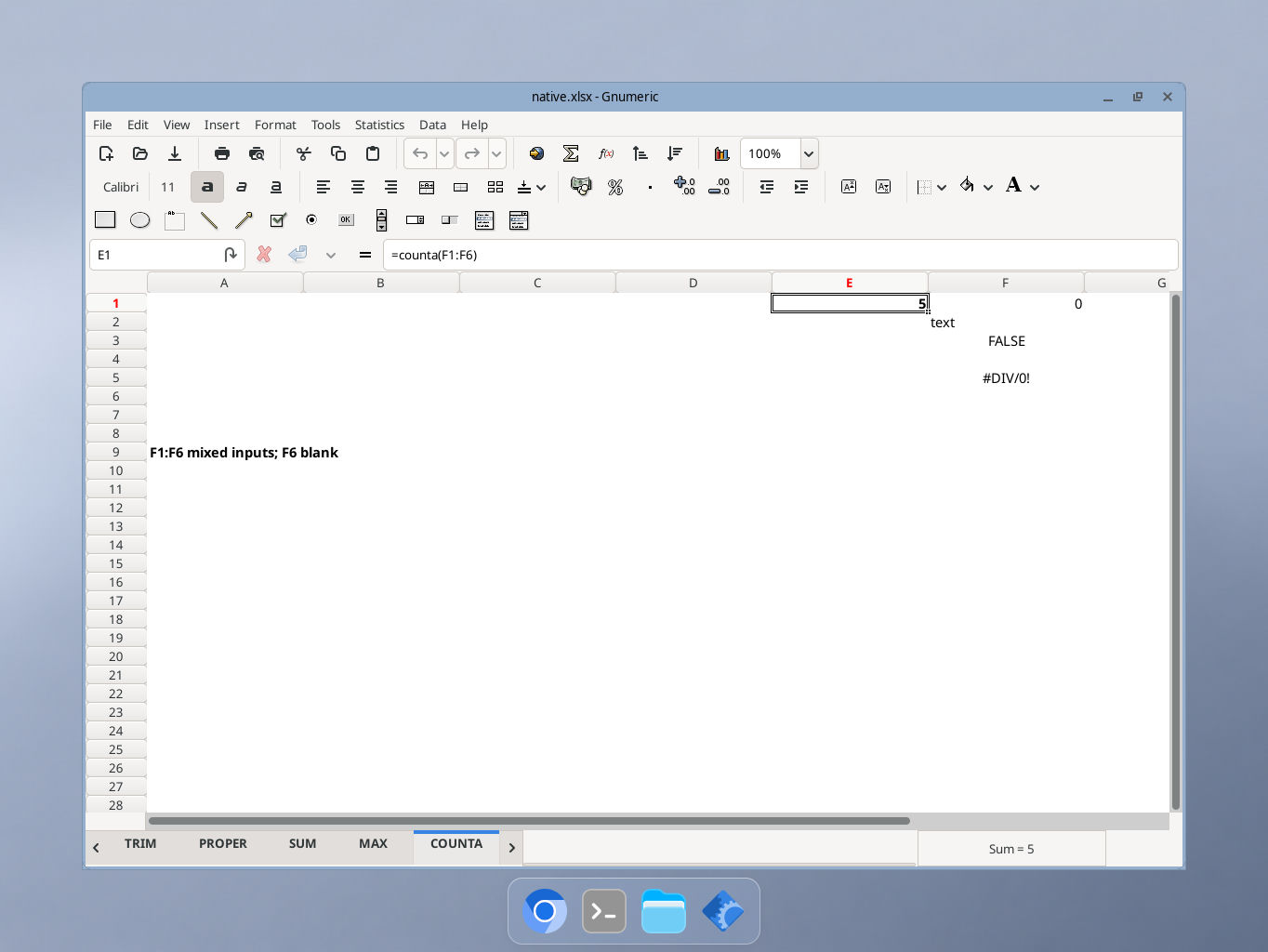
Actual Gnumeric 1.12.57 application, captured 17 October 2026. GUI locale was not independently recorded.