

LEFT Function (Gnumeric)
Extract leading characters with Gnumeric LEFT, with an identifier example, optional character count and Unicode limitations.
Verification status: See the evidence and test scope described in this guide. How formula examples are checked
LEFT extracts characters from the beginning of a text string. Use it for fixed-width prefixes such as a document type or region code. It works in the string’s logical character order; for right-to-left writing, the first characters may appear on the right of the displayed text.
Syntax and defaults
LEFT(s, [num_chars])
s is the source text. num_chars is the number of characters to return and defaults to 1. Zero returns an empty string. A count longer than the string returns the available text rather than padding it. Negative counts produce #VALUE!; fractional nonnegative counts are truncated to an integer in the pinned implementation.
Original worked example
=LEFT("Spreadsheet",6)
The result is Spread, the first six characters. The function returns text and leaves the source unchanged.
Worked worksheet: an invoice prefix
Put the text INV-0042 in A1. =LEFT(A1,3) returns INV. The hyphen and remaining digits are not part of the selected prefix. Keep identifiers stored as text if leading zeros are significant; once a numeric import has removed a leading zero, LEFT cannot recover it.
Additional controls make the count rules explicit:
| Formula | Expected result |
|---|---|
=LEFT("ABC") |
A |
=LEFT("ABC",0) |
empty string |
=LEFT("ABC",9) |
ABC |
=LEFT("ABC",1.9) |
A |
=LEFT("ABC",-1) |
#VALUE! |
=LEFT("Lévy",2) |
Lé |
Advanced use: character positions and Unicode
Gnumeric advances through UTF-8 characters rather than cutting a fixed number of bytes. The precomposed accented letter in Lévy counts as one character, which avoids splitting its byte encoding. However, a visible glyph can consist of more than one Unicode code point, such as a letter followed by a combining accent. LEFT is not a general grapheme-cluster slicer.
For a fixed-width import, confirm that the prefix’s character length is really fixed across all rows. If a delimiter marks the boundary instead, find the delimiter deliberately rather than guessing a fixed count. Retain the original field until you have checked the extracted values.
Whitespace is also text. A leading space consumes part of the requested count. Use a cleanup step only when those spaces are known to be unwanted; automatically trimming a fixed-width format may destroy meaningful alignment or padding.
Errors and troubleshooting
If a prefix looks shifted, inspect leading spaces and the actual stored value. If text is shorter than expected, check the input length rather than treating the absence of padding as an error. A negative count is invalid even if a formula computed it accidentally while searching for a missing delimiter.
Do not confuse extracting characters with converting a number’s displayed format to text. A numeric cell’s presentation may include zeros, currency symbols, or grouping that are not literal source characters. Construct the desired text representation explicitly before extracting from it.
Availability and version history
- Introduced: Original introduction not established in the retained historical evidence.
- Historical source evidence: Supported in Gnumeric 1.12.62, based on the function-specific registration.
- Scope: Desktop; the fn-string function module must be included and enabled.
- Historical check: October 14, 2026; the 1.12.62 registration evidence is not a native execution claim for that release.
New verification: The worked cases were recalculated with Gnumeric 1.12.57 under C.UTF-8 on 17 October 2026 and reconciled against its official source. The historical 1.12.62 registration is retained separately; no identical-behavior or native-test claim is made for that newer version. The selected example below is GUI-verified; a last-supported release is not established.
Related functions
Documentation and verification
Native application screenshot
The selected cell B1 contains =LEFT(A1,3) and displays INV. The screenshot preserves the example input positions described above. Only this selected example is GUI-verified; the other checks retain their stated engine-test scope.
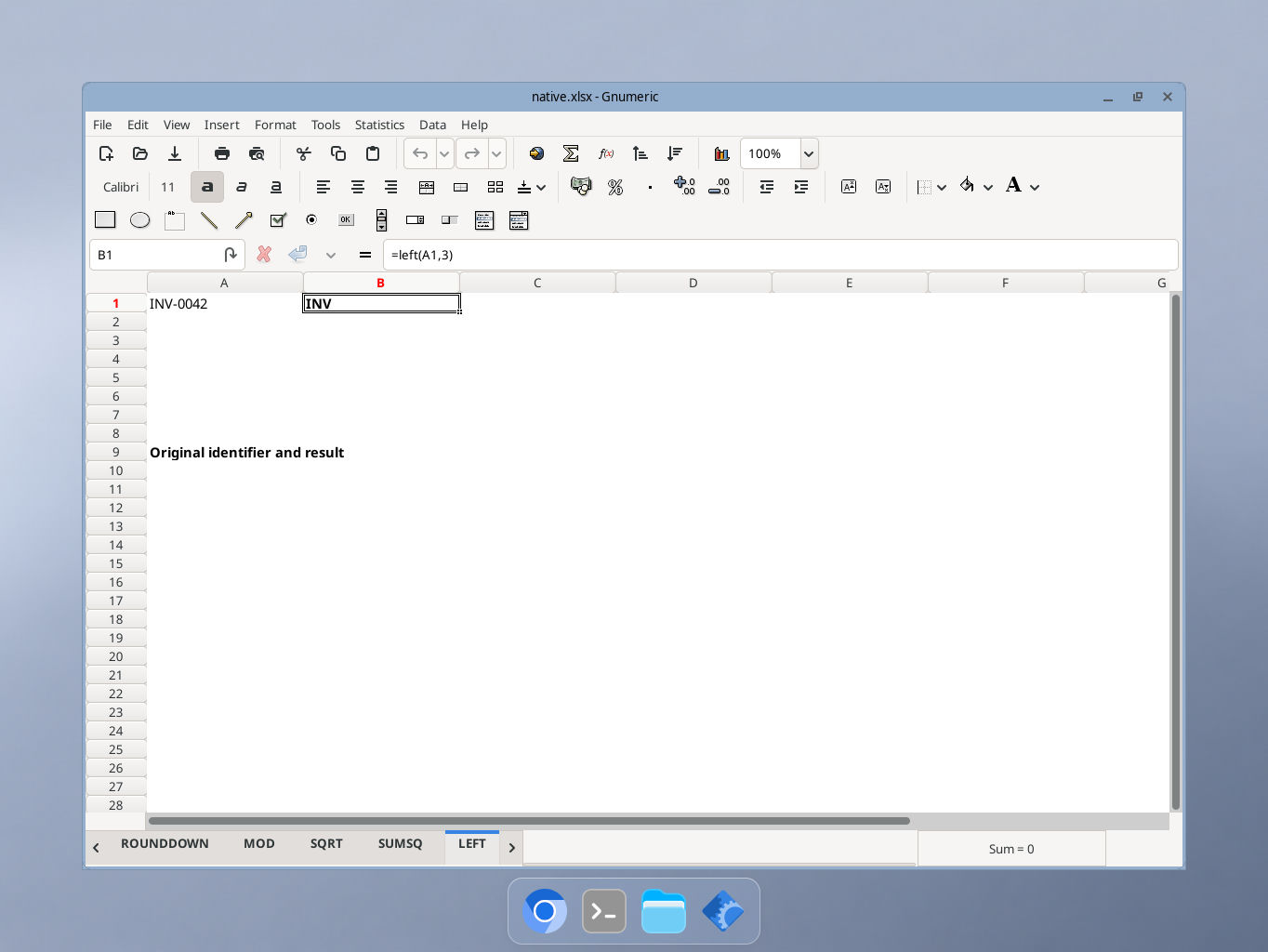
Actual Gnumeric 1.12.57 application, captured 17 October 2026. GUI locale was not independently recorded.