

MID Function (Gnumeric)
Extract text by character position in Gnumeric with MID, one-based indexing, identifier examples and empty/error boundaries.
Verification status: Gnumeric 1.12.57 ssconvert bounded MID fixtures, with a separate primary-example GUI capture; retained 1.12.62 source inspected separately. How formula examples are checked
MID extracts a portion of text from a specified starting position. Positions are one-based: the first character is at position 1. The function is useful for fixed-width identifiers and structured labels, but it does not discover a field’s boundaries automatically.
Syntax and arguments
=MID(s,position,length)
All three arguments are required. s is the source string, position is the starting character position and length is the number of characters requested. There are no omitted-argument defaults. For valid positive positions and nonnegative lengths, fractional numeric arguments are truncated by the examined implementation. Use integer positions and lengths to make the extraction unambiguous.
Gnumeric walks UTF-8 characters for this function, rather than counting bytes. In particular, a precomposed accented letter can count as one character even though its encoding uses multiple bytes. This is not a promise that every displayed symbol, combining sequence or emoji cluster counts as one position; test the actual imported text when such sequences matter.
Worked example
The retained example =MID("Spreadsheet",7,5) returns sheet. Positions 1–6 contain “Spread” and positions 7–11 contain “sheet.” The result is text, even if the selected substring contains only digits.
Put INV-00427-UK in A1. =MID(A1,5,5) returns 00427, preserving the leading zeros. The first four characters are “INV-”, so position 5 begins the five-character identifier. Converting the result to a number would remove those leading zeros; retain text when the code’s width is meaningful.
| Formula | Expected text result |
|---|---|
=MID("Lévy",2,1) |
é |
=MID("abc",2,9) |
bc |
=MID("abc",9,2) |
empty string |
=MID("abc",2,0) |
empty string |
Requesting more characters than remain returns the available suffix, without padding. Starting beyond the end returns empty text. An empty string may look like a blank cell but is a formula result.
Advanced use: find the starting delimiter
For codes whose prefix length varies but whose middle identifier is always five characters, use =MID(A1,SEARCH("-",A1)+1,5). With INV-00427-UK, SEARCH finds the hyphen at position 4 and MID starts at 5, again returning 00427.
This formula assumes that the first hyphen identifies the field and that the field width is five. If prefixes can themselves contain hyphens, or the identifier length varies, that assumption needs revision. Keep a sample containing the shortest and longest permitted prefixes beside the formula when validating a new import.
For a fully variable middle field, locate both surrounding delimiters and subtract their positions to calculate the length. Do not use a large arbitrary length unless retaining the suffix is actually intended.
Errors and troubleshooting
- A position less than 1 produces
#VALUE!, as in=MID("abc",0,1). - A negative length produces
#VALUE!; length zero is valid and returns empty text. - If extraction is shifted by one character, check one-based indexing and whether the delimiter itself was included.
- Spaces are characters. Leading or trailing spaces can change the expected position; clean them deliberately rather than assuming MID ignores them.
- Numeric formatting is not stored text. A number displayed with leading zeros may lose that appearance when converted to a string; store identifiers as text when their exact spelling matters.
- Input errors propagate. Investigate a failed delimiter search before substituting an empty result that could conceal a malformed identifier.
Availability and version history
- Introduced: Documented by 1.12.62; original introduction not established.
- Availability: Supported in Gnumeric 1.12.62, based on the function-specific registration.
- Scope: Desktop; the fn-string function module must be included and enabled.
- Source provenance: Official 1.12.62 source retained October 13–14, reexamined October 17, 2026. No new native execution of that release.
Related functions
Official sources
Native verification scope
On 17 October 2026, Gnumeric 1.12.57 ssconvert recalculated 8 bounded MID fixtures in C.UTF-8. The retained original example and additional fixture outputs matched their independently checked text/position expectations, including the explicitly tested error and empty-string cases where listed. These fixture records are engine evidence; the separate primary-example GUI capture below does not certify untested Unicode sequences, size extremes or other versions. Explanatory combinations not present in those fixtures are logical checks, not claimed additional native runs.
Native application screenshot
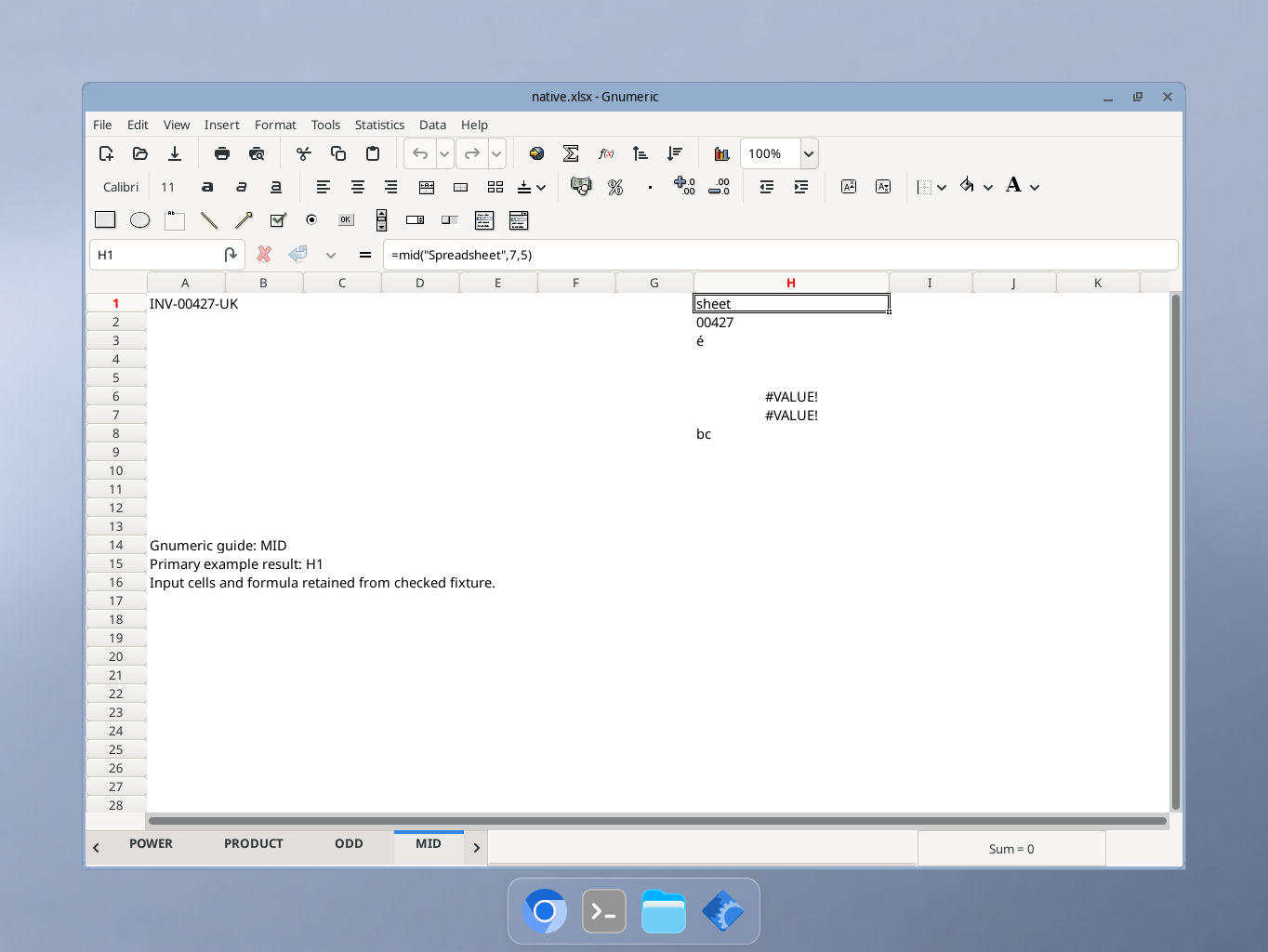
Gnumeric 1.12.57, captured 17 October 2026. The selected H1 cell shows the primary example result, with its formula in the formula bar. Other visible rows are supplemental fixture cases. General number formatting preserves floating-point tails; the GUI locale was not independently recorded.