

LEN Function (Gnumeric)
Count text characters with Gnumeric LEN, including spaces and Unicode distinctions, without confusing length with storage bytes.
Verification status: See the evidence and test scope described in this guide. How formula examples are checked
LEN counts the Unicode characters in a text string. It is useful for checking fixed-width identifiers, finding unexpected whitespace, and validating text before extracting a prefix or suffix. In Gnumeric 1.12.57, the implementation counts UTF-8 code points rather than bytes or visual glyphs.
Syntax
LEN(s)
s is the text to measure. The result is a nonnegative integer. Spaces and other characters in the stored string contribute to the count; the function does not trim or normalize the string first.
Original worked example
=LEN("Calc")
The result is 4, one character for each letter.
Worked worksheet: check an identifier
Put INV-0042 in A1. =LEN(A1) returns 8: three letters, one hyphen, and four digits. This can help identify rows that do not match a required fixed-width format, but a matching length does not establish that the characters themselves are valid.
| Formula | Expected result | Explanation |
|---|---|---|
=LEN("") |
0 | Empty string |
=LEN(" a ") |
3 | Both spaces count |
=LEN("é") |
1 | Precomposed accented character |
=LEN("é") |
2 | Letter followed by combining accent |
=LEN("🙂") |
1 | One supplementary Unicode code point |
The two accented examples can look almost identical but have different underlying sequences. The second contains e followed by a combining acute accent, not the same precomposed character as the first.
Advanced use: distinguish bytes, characters, and display width
A database, file format, or API may impose a byte limit rather than a character limit. LEN alone does not verify that requirement. Nor does it measure how wide a label will appear: a character’s width depends on the font, and a visible symbol can comprise multiple code points.
For text-validation worksheets, define the requirement precisely. A rule such as “eight ASCII characters” includes a character-set restriction in addition to a length. If text can include combining sequences or joined emoji, decide whether code points or visible grapheme clusters are the intended measure before relying on LEN.
A length comparison before and after an authorized cleanup step can reveal that characters were removed. It does not identify which characters were removed or prove the cleanup was appropriate. Keep the original text available for inspection.
Errors and troubleshooting
If a count is larger than what you see, inspect spaces, line breaks, and combining marks. If two visually identical strings have different lengths, check their Unicode representation rather than adding arbitrary offsets to the formula.
An empty-string result from another formula has length zero, but that does not mean the source cell contains no formula. Use a cell-content or formula-presence test when that distinction matters. Likewise, a numeric cell’s displayed formatting is not a reliable substitute for an explicitly constructed text string when counting digits or separators.
LEN propagates source errors rather than repairing them. Resolve an upstream error before treating the missing length as a failed text-validation rule.
Availability and version history
- Introduced: Original introduction not established in the retained historical evidence.
- Historical source evidence: Supported in Gnumeric 1.12.62, based on the function-specific registration.
- Scope: Desktop; the fn-string function module must be included and enabled.
- Historical check: October 14, 2026; the 1.12.62 registration evidence is not a native execution claim for that release.
New verification: The worked cases were recalculated with Gnumeric 1.12.57 under C.UTF-8 on 17 October 2026 and reconciled against its official source. The historical 1.12.62 registration is retained separately; no identical-behavior or native-test claim is made for that newer version. The selected example below is GUI-verified; a last-supported release is not established.
Related functions
Documentation and verification
Native application screenshot
The selected cell B1 contains =LEN(A1) and displays 8. The screenshot preserves the example input positions described above. Only this selected example is GUI-verified; the other checks retain their stated engine-test scope.
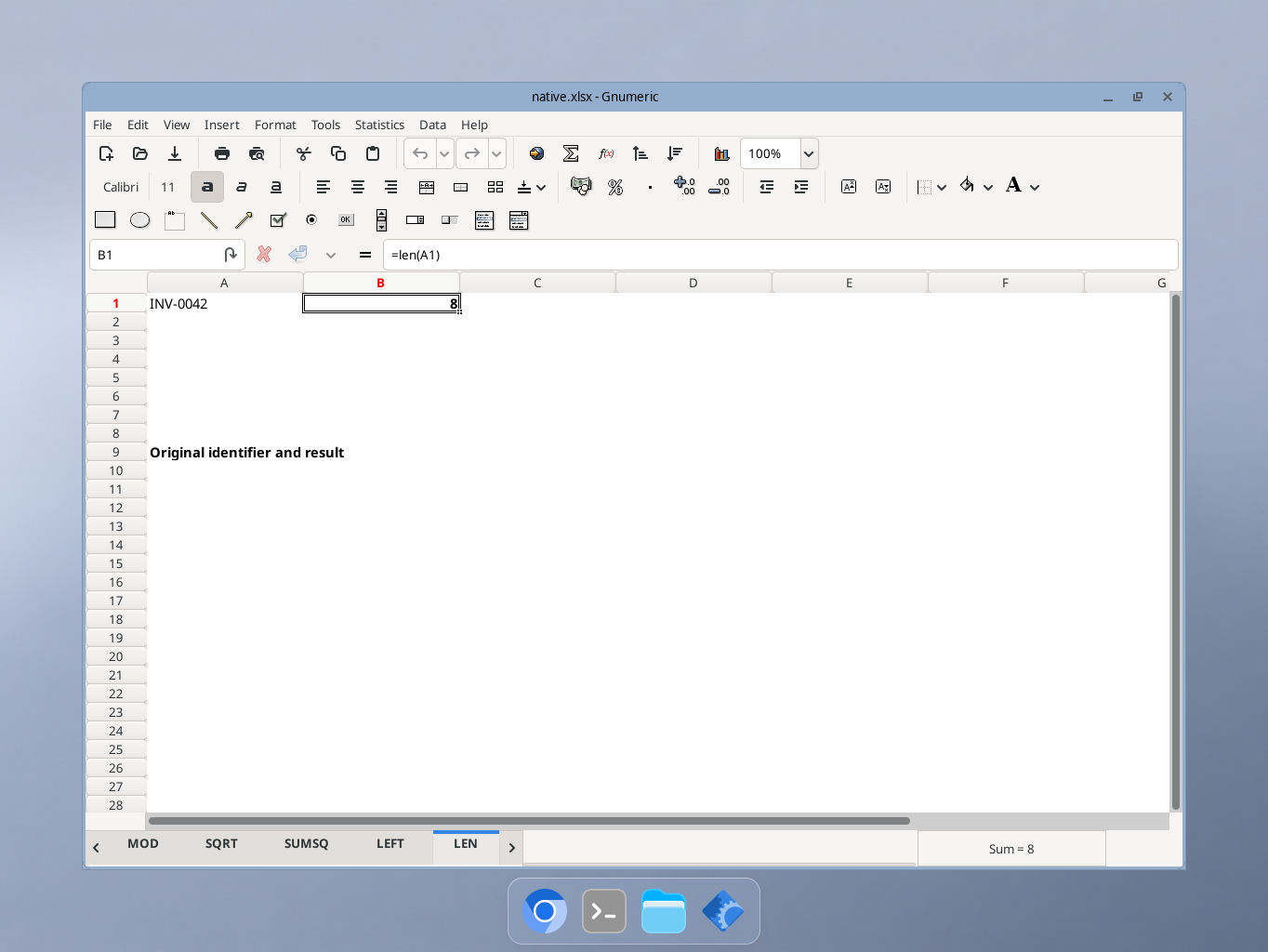
Actual Gnumeric 1.12.57 application, captured 17 October 2026. GUI locale was not independently recorded.