

OFFSET Function in Gnumeric: Syntax, Examples and Compatibility
Use OFFSET in Gnumeric. Return a shifted reference, inheriting the starting range’s dimensions unless you override them. Includes native 1.12.57 examples and version-scoped 1.12.62 source checks.
Verification status: See the evidence and test scope described in this guide. How formula examples are checked
Quick answer: Return a shifted reference, inheriting the starting range’s dimensions unless you override them.
Evidence boundary: The examples explicitly labelled native below were calculated in Gnumeric 1.12.57 on October 18, 2026. The argument explanations also cite pinned 1.12.62 source and the official manual. There was no native 1.12.62 run, and these cases do not certify every release, locale or file-import scenario.
Availability and version history
- Introduced: Documented by 1.12.62; original introduction not established.
- Availability: Supported in Gnumeric 1.12.62, based on the function-specific registration.
- Scope: Desktop; the fn-lookup function module must be included and enabled.
- Checked: October 18, 2026. Bounded native 1.12.57 run; pinned 1.12.62 source reviewed separately. Original introduction remains unestablished.
Syntax and arguments
=OFFSET(reference, rows, cols, [height], [width])
reference is a cell or range. rows shifts down when positive and up when negative; cols shifts right when positive and left when negative. A zero offset leaves that coordinate unchanged.
The optional dimensions are independent:
- Omitted
heightinherits the starting reference’s height. - Omitted
widthinherits the starting reference’s width. - An explicitly supplied height or width must be positive. In the inspected implementation, a size below 1 produces
#VALUE!.
OFFSET returns a reference. Use SUM to aggregate its cells or ROWS and COLUMNS to inspect the returned shape. It does not move the original data.
Set up a small numeric table
Enter 10, 42, 15, 20 into B2:B5, and 100, 200, 300, 400 into C2:C5. Put your result formulas outside those input ranges.
Worked example: shift a cell and select three rows
=OFFSET(B2,1,0)
=SUM(OFFSET(B2,0,0,3,1))
Native results: 42 and 67. The first reference shifts from B2 to B3. The second starts at B2 and explicitly selects three rows and one column, B2:B4, whose values sum to 10 + 42 + 15.
Worked example: omitted size preserves a range
=SUM(OFFSET(B2:B3,1,0))
Native result: 57. B2:B3 has two rows; shifting it down one row produces B3:B4, not just B3. Thus the calculation is 42 + 15.
Check a two-dimensional starting range:
=ROWS(OFFSET(B2:C3,1,0))
=COLUMNS(OFFSET(B2:C3,1,0))
Both returned 2, confirming the inherited two-row, two-column shape. Starting with a single cell can conceal these defaults, which is why an actual range is important in a control test.
Worked example: override only one dimension
=SUM(OFFSET(B2:C3,1,0,1))
Native result: 242. The explicit height becomes one row, while omitted width remains two columns. The returned reference is B3:C3, containing 42 and 200.
For a single-cell result, explicitly provide both dimensions:
=SUM(OFFSET(B2:B3,1,0,1,1))
Native result: 42. This resizes the shifted reference to B3 alone.
Errors and practical checks
=OFFSET(B2,0,0,0,1)returned #VALUE! because the requested height is zero.=OFFSET(A1,-1,0)returned #REF! because the reference would start above the first row.- An offset is a displacement, not an absolute row or column number. One row from B2 means B3, not row 1.
- Check the range dimensions before interpreting a sum; an accidentally inherited width can include an extra numeric column.
Use explicit dimensions when you intend a fixed-size window. Consider a direct or INDEX-based reference when it is easier to audit. The native fixture uses integer offsets and dimensions; it does not establish fractional-argument behavior, every sheet-edge case, volatility/performance, dynamic-array spilling or cross-application round trips.
Native screenshot and calculation evidence
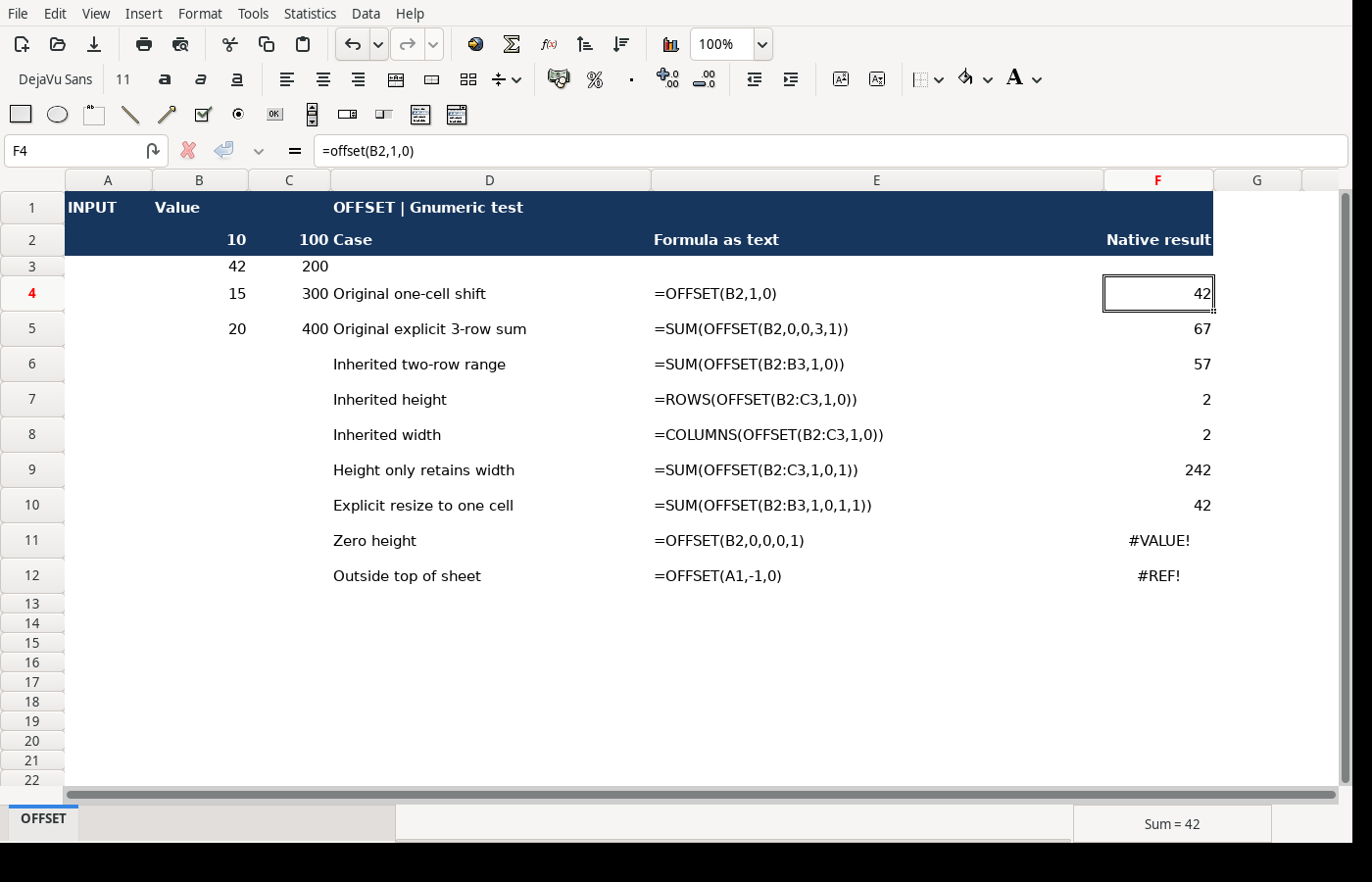
The image is an unmodified capture of the actual Gnumeric window opening the cache-free fixture. The formula-text column is a reading aid; the result column contains live formulas. The fixture was also recalculated and saved by ssconvert 1.12.57 through Gnumeric’s native workbook format, then read back as XLSX to inspect its formulas and values. The screenshot is from the GUI opening the original fixture; it is not a screenshot of a different application or a constructed illustration.
Formula examples use English function names and comma argument separators. Entry separators can vary with locale; the native run does not establish other locale conventions.
Related guides and official documentation
-
Gnumeric documentation for OFFSET — function syntax and current vendor information.
Editorial verification: Cache-free input formulas, native-saved formula/value readback, actual errors and raw screenshots were retained for these bounded cases. Source/manual checks and runtime results remain version-separated. See the editorial testing standards for the evidence policy.