

Booking conflict workbook for LibreOffice Calc
Use this original workbook to compare up to twelve room or equipment reservations on one local clock. It flags overlapping time intervals for an identical resource ID and shows which numbered reservations intersect. It is a small overlap checker, not a calendar connection or booking service.
Download the editable files
Both files contain a Bookings sheet and a Pairs calculation sheet. Five fictional reservations demonstrate the rules; seven slots are empty. These are editable workbooks, not registered .ots templates. Save a working copy before replacing the examples. Neither file contains macros, scripts or external workbook links.
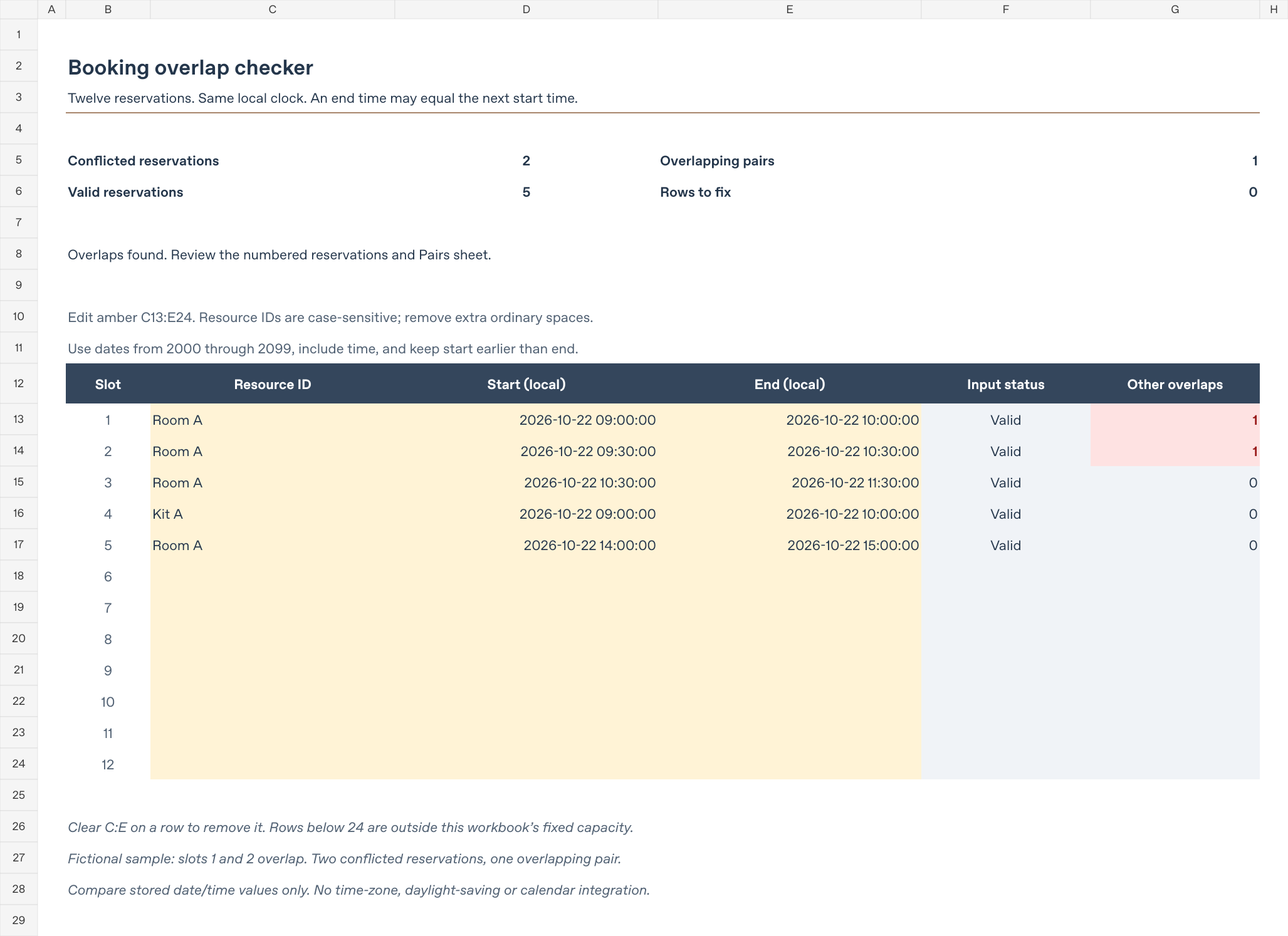
This is a rendered preview of the supplied workbook, not a screenshot of the LibreOffice application.
Enter reservations
Edit only the amber cells C13:E24 on Bookings. Column B numbers the twelve slots; F:G and the summary cells contain formulas.
| Column | Input |
|---|---|
| C | Resource ID as nonempty text, such as Room A or Kit A. |
| D | Start date and time, stored as a numeric spreadsheet date/time. |
| E | End date and time, later than the start. |
Both timestamps must be on or after 2000-01-01 00:00:00 and before 2100-01-01 00:00:00. Use four-digit years. The cells display year-month-day and time including seconds. For an unambiguous formula entry in Calc, =DATE(2026;10;22)+TIME(9;0;0) represents the sample start. Date text that remains text is flagged rather than silently converted by the workbook.
Resource IDs are case-sensitive: Room A and room a are different resources. Leading, trailing and repeated ordinary spaces produce Fix inputs. The workbook does not normalize tabs, nonbreaking spaces or other invisible characters; avoid them and reuse a consistent ID. Asterisks and question marks are literal characters here, not wildcard patterns.
To remove a reservation, clear all three amber cells in that row. Leave its formulas intact. Spare slots are rows 18–24. The formulas cover twelve reservations only; typing below row 24 does not extend them. Do not insert, delete or sort partial ranges without rebuilding and retesting the references.
Read the overlap results
Two reservations overlap when all three conditions hold:
- Their resource IDs match exactly.
- The first start is earlier than the second end.
- The first end is later than the second start.
These are half-open intervals: a reservation ending at 10:30 and another starting at 10:30 do not conflict. Zero-length and reversed intervals are invalid. A reservation can cross midnight if its end has the correct later date.
The example uses 22 October 2026:
| Slot | Resource | Start | End | Other overlaps |
|---|---|---|---|---|
| 1 | Room A | 09:00 | 10:00 | 1 |
| 2 | Room A | 09:30 | 10:30 | 1 |
| 3 | Room A | 10:30 | 11:30 | 0 |
| 4 | Kit A | 09:00 | 10:00 | 0 |
| 5 | Room A | 14:00 | 15:00 | 0 |
The result is 2 conflicted reservations, 1 overlapping pair, 5 valid reservations and 0 rows to fix. Slot 3 touches slot 2 but does not overlap it. Slot 4 uses a different resource.
Conflicted reservations counts rows with at least one conflict. Overlapping pairs counts each distinct pair once. They are not interchangeable: three mutually overlapping reservations produce three conflicted reservations and three pairs. Two identical reservations in separate rows count as two reservations and one pair; duplicates are not merged.
Column G counts each reservation’s other overlaps. On Pairs, row and column numbers correspond to the slots. A 1 marks an overlap, and the diagonal is zero. Every pair appears twice in this symmetric matrix, which is why the sum of the row overlap counts is divided by two.
Fix incomplete or invalid rows first
A completely blank input row is ignored. Partial rows, non-text resource IDs, extra ordinary spaces, text timestamps, out-of-range dates, equal endpoints and reversed intervals produce Fix inputs. While any row is invalid, all three reservation/pair summaries and active rows’ overlap counts show n.a.. Rows to fix remains numeric. An incomplete reservation therefore cannot silently turn the main result into “no overlaps.”
The Pairs sheet excludes invalid rows while still showing intersections among valid ones. Do not interpret that partial matrix as a complete result until Rows to fix is zero. When every input row is empty, all four summaries show zero and the message says no reservations are entered.
These checks flag problems after calculation; they are not input-entry locks. The date bounds also reject logical TRUE/FALSE values in the tested engine. This does not rely on ISNUMBER alone rejecting logical values. Keep formula cells intact when pasting or clearing inputs.
Try these changes in a disposable copy
Start each check from a fresh download, or restore all changed cells before the next check.
- Change slot 2’s start in D14 to 10:00 on the same date. It now touches slot 1 and ends when slot 3 starts. Expect 0 conflicted reservations and 0 pairs.
- Copy only C13:E13 into C14:E14. The duplicate reservation produces 2 conflicted reservations and 1 pair.
- Change slot 3 to Room A, 09:45–10:15 on the same date. Slots 1, 2 and 3 mutually overlap: expect 3 conflicted reservations and 3 pairs.
- Clear D13 only. Expect 1 row to fix and unavailable reservation/pair summaries. Restore its start or clear C13:E13 to remove that reservation.
Scope and verification
All entries must use the same local clock. There is no timezone conversion, daylight-saving adjustment, recurring-reservation expansion, setup buffer, capacity sharing or synchronization with an actual calendar. Do not use it to resolve ambiguous or repeated daylight-saving times. A zero conflict count does not establish that a resource is available outside the entered rows. The workbook does not reserve anything.
Comparisons use the stored numeric values, not rounded display text. Use ordinary minute/second entries rather than imported fractional-second timestamps. Nearly equal underlying values can differ even if their displayed times look identical. Keep the supplied date base when copying dates between workbooks.
Thirty-seven input cases were checked, including overlaps, containment, touching and disjoint intervals, different IDs, case sensitivity, literal wildcard characters, duplicates, invalid and missing inputs, logical values, the date bounds, a cross-midnight interval, the final slot, a fully empty table, all twelve identical reservations, and formula-produced dates, logical values and an error. An independent calculation used unordered pairs and interval intersection to check every matrix cell, row status, row overlap count and summary.
Native recalculation used the free LibreOfficeDev 26.8.0.0.alpha0, build 2c87e51eeaa2b413ff4ae097b2705eea1995d8e5, on Linux in headless mode. Formula caches were removed from disposable XLSX copies while preserving inputs and formula text. Conversion to ODS produced fresh results for the 37 cases and the final workbook. The ODS download comes from this conversion path.
This is development-build, headless evidence, not testing in a stable LibreOffice release, Excel, ONLYOFFICE or a graphical interface. No native application screenshot is supplied. Repeat the sample checks in your installed version before relying on your working copy.
Related guides and first-party references
- EXACT function guide
- IFERROR function guide
- COUNTIF function guide
- More starter downloads
- Official LibreOffice Help: EXACT, TRIM, date/time values and date bases, logical functions, and information functions.
The workbook design, fictional resource IDs and reservation data are original examples, not an official LibreOffice template.