

PlanMaker NORM.S.DIST Function: Choose cumulative probability or density
Use NORM.S.DIST, NORMSDIST in FreeOffice PlanMaker 2024 with distinct signatures, probability modes, worked calculations and numerical limits.
Verification status: See the evidence and test scope described in this guide. How formula examples are checked
Quick answer: =NORM.S.DIST(1,TRUE) is approximately 0.8413447461, while =NORM.S.DIST(1,FALSE) is approximately 0.2419707245. The required second argument changes the meaning of the result, not simply its formatting.
Syntax: the modern switch matters
=NORM.S.DIST(x, Cumulative)
=NORMSDIST(x)
The standard normal model has mean 0 and standard deviation 1. In NORM.S.DIST, TRUE selects the left cumulative distribution function, P(Z ≤ x). FALSE selects the probability density at x. Supply the mode explicitly. NORMSDIST has only one argument and always returns the cumulative value; it cannot be used as a density function by keeping the same signature.
This modern two-argument contract is the focus here. Existing PHI and GAUSS guides already compare NORMSDIST with standard-normal density and central area. Those functions help cross-check meanings, but their argument contracts are different.
Build a mode-comparison worksheet
Enter these inputs in a fresh sheet:
| Cell | Value |
|---|---|
| A2 | -1 |
| A3 | 0 |
| A4 | 1 |
In B2 enter =NORM.S.DIST(A2,TRUE) and in C2 enter =NORM.S.DIST(A2,FALSE). Copy both formulas down through row 4. The independent mathematical references are:
| x | Cumulative TRUE | Density FALSE |
|---|---|---|
| -1 | 0.1586552539 | 0.2419707245 |
| 0 | 0.5 | 0.3989422804 |
| 1 | 0.8413447461 | 0.2419707245 |
The density is symmetric about zero; the cumulative probability increases with x. In D4, =NORMSDIST(A4) should match the cumulative column according to the documented contract. It is not a replacement for C4.
Independent controls use the density exp(−x²/2)/sqrt(2π) and its integral. A reproducible density formula is =EXP(-(A4^2)/2)/SQRT(2*PI()). Parentheses make the intended negative exponent explicit.
Density is not the probability of an exact value
For a continuous normal distribution, P(Z=x) is zero. A density value describes probability per unit of the standardized variable; probability over an interval comes from integrating it. Do not label 0.2419707245 as the probability that Z equals 1.
For example, =NORM.S.DIST(2,TRUE)-NORM.S.DIST(-2,TRUE) has mathematical value 0.9544997361. This is the area between −2 and 2. Subtracting two density values would give zero because the endpoint densities are equal, which is not the interval probability.
Practical use: standardize a measurement first
Suppose a model has mean 100 and standard deviation 15. A measurement of 115 has standardized score (115-100)/15=1. Its model cumulative probability is =NORM.S.DIST((115-100)/15,TRUE), approximately 0.8413447461. An upper-tail probability uses =1-NORM.S.DIST((115-100)/15,TRUE), approximately 0.1586552539.
If you need the density in the original measurement units, divide the standard-normal density by 15. Thus the density at 115 is approximately 0.0161313816 per measurement unit. Omitting this scale factor produces the wrong units. NORM.DIST accepts the model mean and standard deviation directly.
These values describe the specified probability model. Standardizing data does not prove the data are normally distributed, make dependent observations independent, or estimate the model parameters.
Boundaries and compatibility
Finite negative and positive x values are meaningful. No degrees of freedom or scale parameter is supplied to this function. The short official page does not comprehensively specify text coercion, omitted-mode errors, or nonfinite inputs; use explicit numeric x and a Boolean mode rather than relying on undocumented conversions.
The standard-normal inverse is NORM.S.INV. Its numerical inverse approximation need not return exact mathematical zero at probability 0.5, so preserve raw precision when checking a round trip.
The official documentation says NORM.S.DIST adds a cumulative argument to NORMSDIST. It does not make the one- and two-argument signatures interchangeable or declare NORMSDIST retired. Its Excel 2010 compatibility note dates Excel support, not PlanMaker introduction. English examples use commas; localized formula separators may differ.
Native results and visible precision
Native cumulative results at −1, 0 and 1 are approximately 0.158655253931457, 0.5 and 0.841344746068543. The native density at ±1 is approximately 0.241970724519143, and at zero approximately 0.398942280401433. NORMSDIST(1) matches the modern TRUE-mode result. The native interval expression between −2 and 2 returns approximately 0.954499736103642.
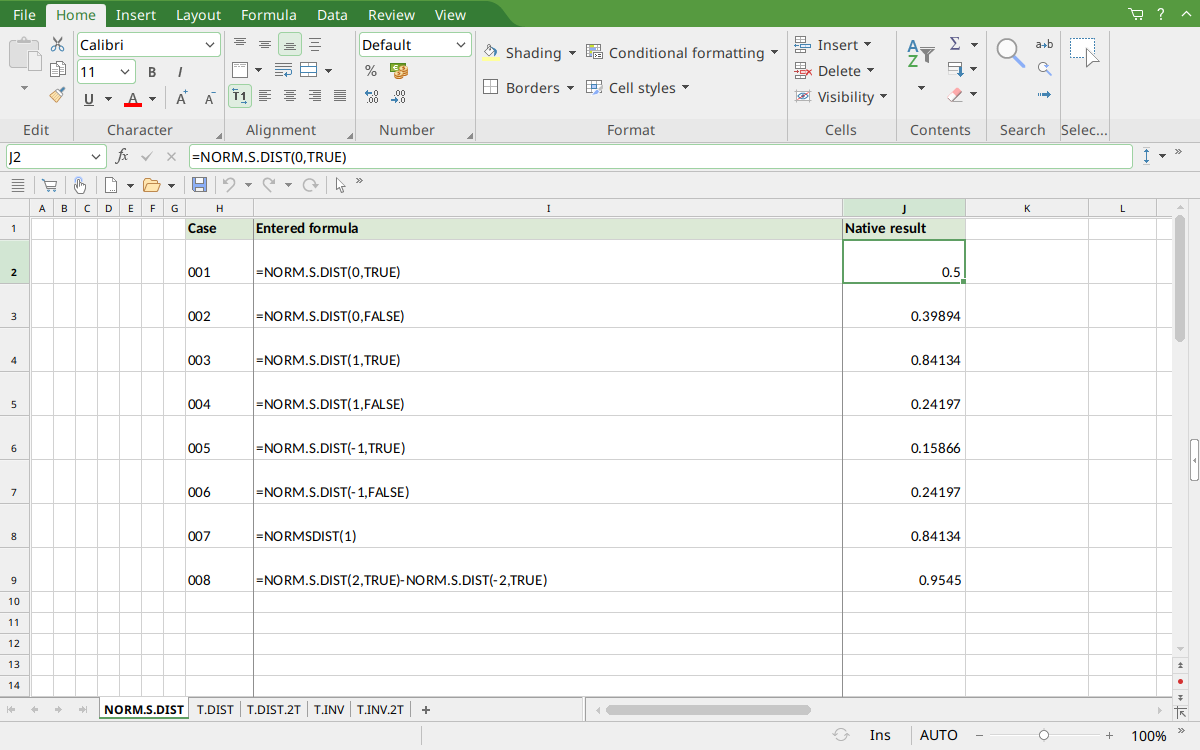
FreeOffice PlanMaker 2024 rev F1238.1005: selected J2 contains =NORM.S.DIST(0,TRUE) and displays 0.5. Display rounding is separate from the raw saved values described above.
Version and evidence scope
Official FreeOffice PlanMaker 2024 references checked October 18, 2026: reference 1, reference 2. First introduction release is unknown from these references. Documentation for this edition does not establish identical behavior in every other edition.
The 8 selected scalar formulas for this guide were tested on October 18, 2026 in FreeOffice PlanMaker 2024 rev F1238.1005, 64-bit, saved in PMDX format and reopened with formulas and results preserved. The native observations are distinct from independent mathematical references and from teaching layouts or advanced expressions not individually executed. Proprietary implementation code has not been inspected. These bounded cases do not establish every argument, input type, edition or export behavior.