

PRODUCT Function (Gnumeric)
Multiply numeric values in Gnumeric with PRODUCT, mixed-range type handling, empty-range behavior and compound growth factors.
Verification status: Gnumeric 1.12.57 ssconvert bounded PRODUCT cases, with a separate primary-example GUI capture; retained/pinned 1.12.62 source inspected separately. How formula examples are checked
PRODUCT multiplies numeric inputs from a list of values or ranges and returns one number. It is useful for factors, dimensions and compound changes. Its input filtering can omit numeric-looking text, so audit the types of the factors instead of assuming every displayed number is multiplied.
Syntax and input collection
=PRODUCT(value1[,value2,...])
Supply numeric values, cell references, ranges or a combination. There is no optional mode or precision argument: every supplied argument contributes data. In referenced ranges, the examined implementation ignores strings, Boolean values and blank cells. Numeric zero is included and makes the resulting product zero. Input errors propagate.
The native Gnumeric 1.12.57 tests also ignored direct quoted text and logical constants: =PRODUCT(2,"3",TRUE) returned 2, and =PRODUCT(2,"bad") returned 2. Do not assume direct numeric text will be converted to a number or that a direct nonnumeric string must raise an error. These are recorded results for the tested version; retained 1.12.62 collection flags alone do not establish identical behavior in another release. Prefer numeric cells when a value is meant to be a factor.
Worked example
The original formula =PRODUCT(2,3,4) returns 24. To reproduce a range-based calculation, enter 2, 3 and 4 in A1:A3 and use =PRODUCT(A1:A3).
Now put the text value “5” in A4 and TRUE in A5. Use a leading apostrophe when entering 5 if necessary to force text storage; the apostrophe is not part of the cell value. =PRODUCT(A1:A5) still returns 24, because those two referenced values are excluded. Replacing A4 with numeric 5 changes the product to 120.
A completely blank range such as A7:A8 returns 0 in Gnumeric, not the mathematical empty-product identity 1. A zero result can therefore mean either an actual zero factor or no usable numeric factors. Check the numeric count to distinguish those cases.
Advanced example: changing growth factors
Enter 1.10, 0.95 and 1.20 in B1:B3. These represent a 10% increase, a 5% decrease and a 20% increase. =100*PRODUCT(B1:B3) returns 125.4, because 100×1.10×0.95×1.20 = 125.4.
Adding the percentage changes would suggest a 25% increase, but sequential changes compound against different bases. PRODUCT applies the factors in succession. If the factor inputs come from percentage-change cells, add 1 to each change in a helper column and multiply that column. A change of -100% creates a zero factor; subsequent multiplication cannot restore the original amount in this simple model.
For box volume, PRODUCT can multiply length, width and height, provided all dimensions use the same unit. The resulting unit is cubed. The function does not validate physical dimensions or convert units automatically.
Errors and checks
- A referenced error is not excluded like a blank. Locate the faulty factor before wrapping the result in IFERROR.
- Text-formatted numbers can make a product too small or too large by omitting a factor. Compare COUNT with the expected number of observations.
- An entirely blank range returns zero. Do not infer a measured zero from that result alone.
- Multiplying a list is different from adding pairwise products; a weighted sum usually needs SUMPRODUCT or explicit helper products and SUM.
- Very long products or extreme factors can overflow or underflow. These examples verify ordinary bounded arithmetic, not unlimited precision.
Availability and version history
- Introduced: 0.25, according to the official release history. This was a development-series release.
- Availability: Supported in Gnumeric 1.12.62, based on the function-specific registration.
- Scope: Gnumeric desktop; the function is registered in the application core.
- Source provenance: Official source retained on October 13–14 and examined again October 17, 2026; core PRODUCT source freshly retrieved at the same pinned revision. No new 1.12.62 native execution.
Related functions
Official evidence
Native verification scope
On 17 October 2026, Gnumeric 1.12.57 ssconvert recalculated 7 bounded PRODUCT cases in C.UTF-8, including the original worked example and the specific additional formulas covered above. Numerical differences from exact arithmetic are limited here to floating-point rounding. These fixture records are engine evidence; the separate primary-example GUI capture below does not certify other versions or extreme inputs. The direct-text/Boolean cases differed from initial source-informed predictions; the guide reports the observed 1.12.57 results explicitly rather than claiming cross-version coercion equivalence. Any additional explanatory arithmetic is independently checked, rather than represented as another native run.
Additional retained documentation
Native application screenshot
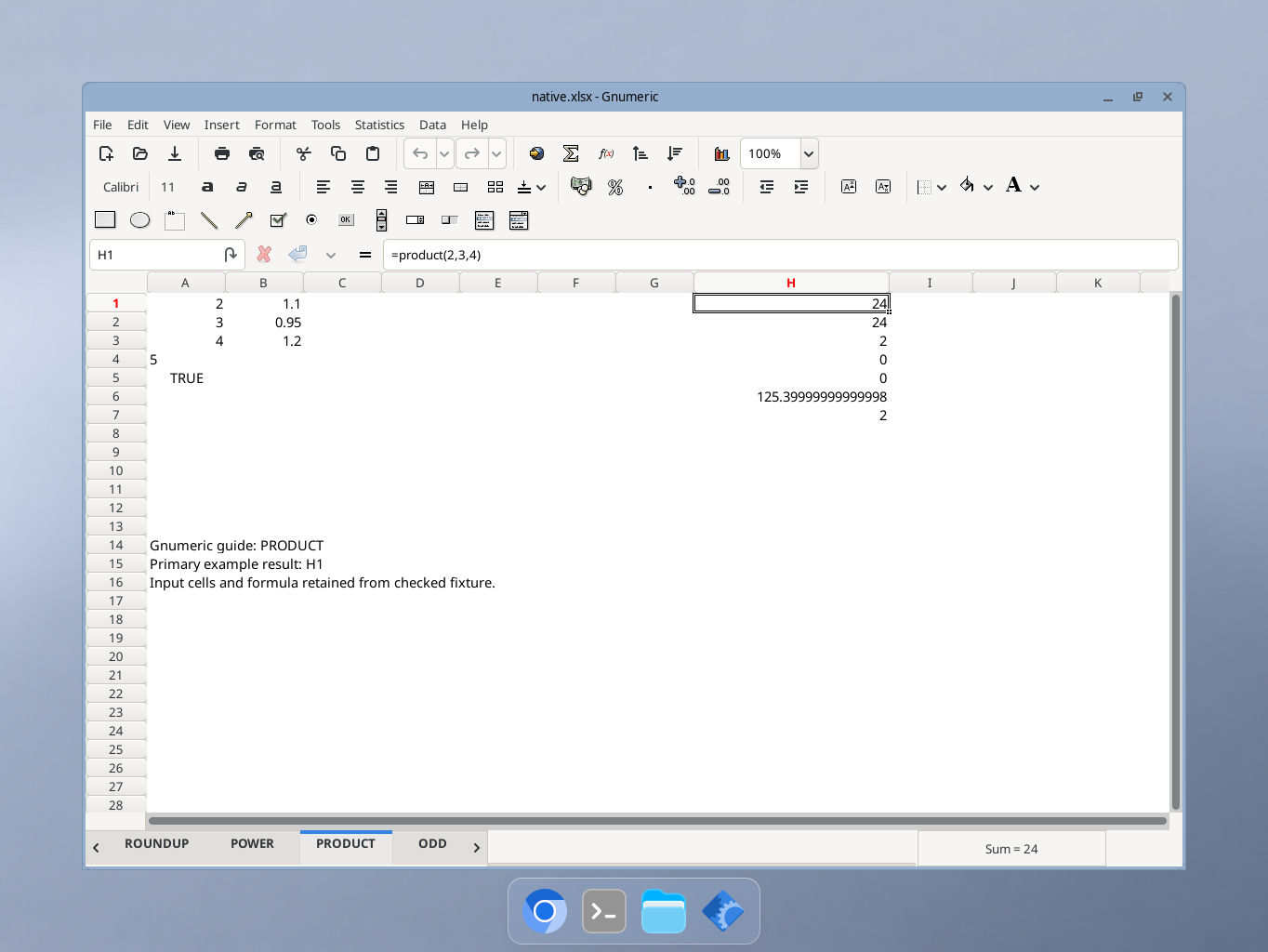
Gnumeric 1.12.57, captured 17 October 2026. The selected H1 cell shows the primary example result, with its formula in the formula bar. Other visible rows are supplemental fixture cases. General number formatting preserves floating-point tails; the GUI locale was not independently recorded.