

ROUNDDOWN Function (Gnumeric)
Round toward zero with Gnumeric ROUNDDOWN, including negative numbers, decimal-place arguments and tens or hundreds rounding.
Verification status: See the evidence and test scope described in this guide. How formula examples are checked
ROUNDDOWN reduces a number’s precision toward zero. For a positive value that means a smaller value; for a negative value it means a less negative value. “Down” in the function name does not mean toward negative infinity.
Syntax and precision
ROUNDDOWN(x, [d])
x is the number. Gnumeric allows d to be omitted, in which case it defaults to zero. A positive integer d keeps that many decimal places, zero keeps an integer, and a negative integer removes places to the left of the decimal point. Prefer integer precision arguments; the pinned implementation truncates fractional precision when choosing the power of ten.
The output is numerical. Formatting it with more decimal places can add displayed zeros, but cannot restore digits removed by ROUNDDOWN.
Original worked example
=ROUNDDOWN(1.29,1)
The result is 1.2. One decimal place is retained, and the discarded 9 does not cause rounding to 1.3.
Worked example: negative values and hundreds
| Formula | Native result | Interpretation |
|---|---|---|
=ROUNDDOWN(-1.29,1) |
-1.2 | Moves toward zero |
=ROUNDDOWN(-3.3) |
-3 | Default integer precision |
=ROUNDDOWN(1501.15,-2) |
1500 | Removes tens, units, and fractional remainder |
=ROUNDDOWN(-1501.15,-2) |
-1500 | Same precision, toward zero |
=ROUNDDOWN(1.29,1.9) |
1.2 | Fractional precision truncated |
For a worksheet version, place the numbers in A2:A5 and their requested integer precision in B2:B5. Enter =ROUNDDOWN(A2,B2) in C2 and fill down. Keep the precision column visible so reviewers can see why some rows retain decimals and others round to hundreds.
Advanced use: distinguish a cap from a floor
If a rule requires a result no greater than the original value on the number line, ROUNDDOWN is not sufficient for negative inputs: -1.2 is greater than -1.29. Use a function whose definition matches the mathematical floor or interval rule you actually require, and verify its sign and significance arguments separately.
ROUNDDOWN also differs from rounding to the nearest value. In a repeated calculation, truncating each intermediate result can introduce a systematic loss of magnitude. Keep full precision through intermediate steps when the policy only requires a final rounded output.
A decimal precision is not an arbitrary step size. Rounding to hundreds uses -2; rounding to a multiple such as 25 is a different operation and needs an explicitly designed formula or appropriate function.
Relationship to TRUNC
In Gnumeric 1.12.57, the ROUNDDOWN callback directly delegates to the same implementation used by TRUNC. Both therefore share the toward-zero numerical operation and optional precision behavior in this pinned version. This is a Gnumeric implementation relationship, not a claim about every release or other spreadsheet applications.
Errors and troubleshooting
=ROUNDDOWN("bad",1) returns #VALUE! in the native check. Verify numerical inputs and locale-specific argument separators. Avoid extreme precision values as a way to request “unlimited precision”: the implementation has floating-point exponent limits, and adding precision cannot create information absent from the input.
If -3.3 becomes -3, the function is behaving as documented. If a result appears to keep extra digits, distinguish the stored value from the display format, and inspect calculations before and after the rounding step.
Availability and version history
- Introduced: Documented by Gnumeric 0.27, whose release notes mention fixes; the original introduction is not established.
- Historical source evidence: Supported in Gnumeric 1.12.62, based on the function-specific registration.
- Scope: Desktop; the fn-math function module must be included and enabled.
- Historical check: October 14, 2026. The retained 1.12.62 registration check is not a native execution claim for that release.
New verification: Official Gnumeric 1.12.57 source and bounded native engine cases were checked on 17 October 2026 under C.UTF-8. This guide’s worked results refer to that release; the historical 1.12.62 registration is retained separately and does not establish identical behavior. The selected example below is GUI-verified; a last-working release is not established.
Related functions
Documentation and verification
Native application screenshot
The selected cell C2 contains =ROUNDDOWN(A2,B2) and displays -1.2. The screenshot preserves the example input positions described above. Only this selected example is GUI-verified; the other checks retain their stated engine-test scope.
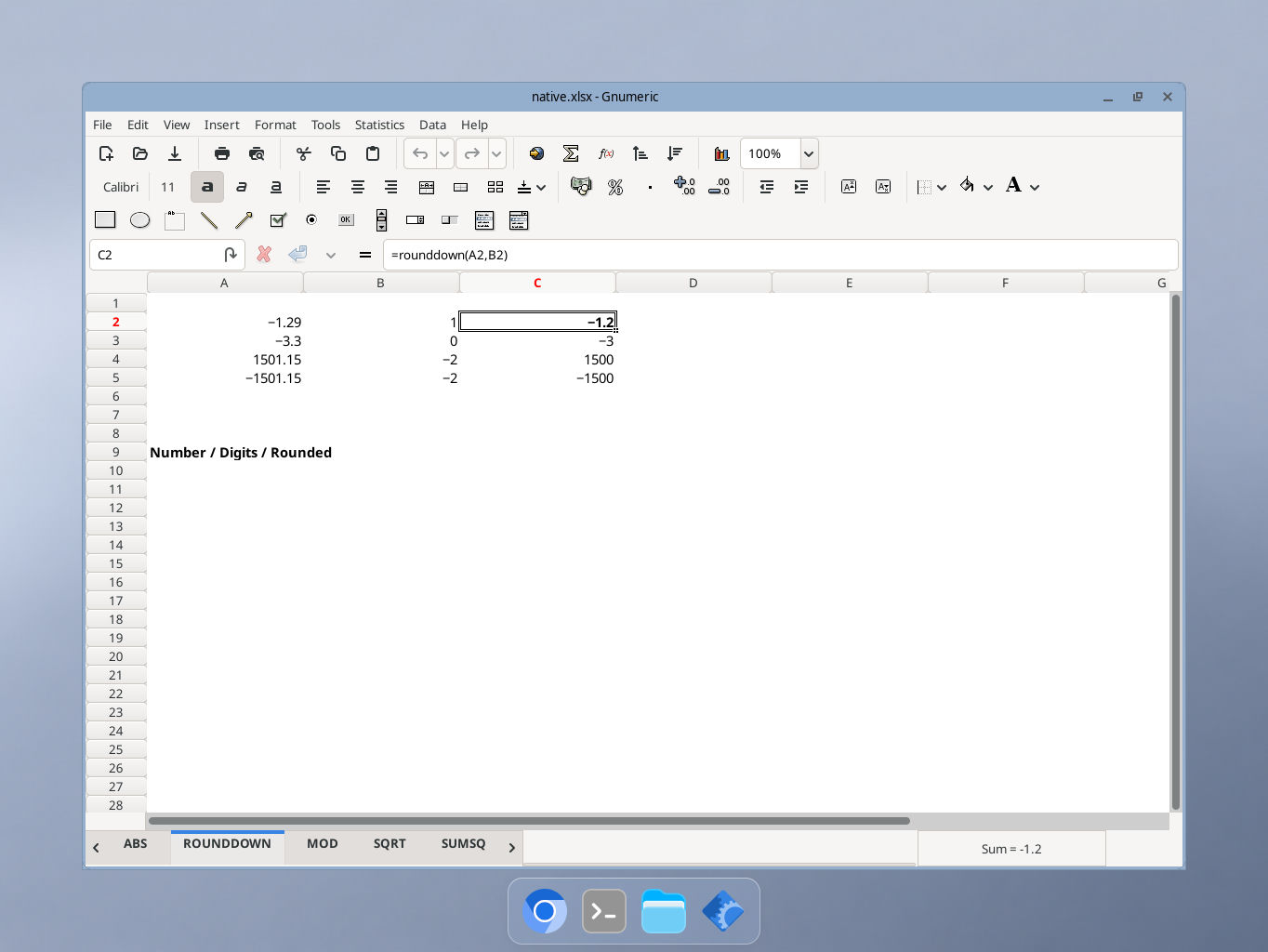
Actual Gnumeric 1.12.57 application, captured 17 October 2026. GUI locale was not independently recorded.