

REPT Function (Gnumeric)
Repeat text in Gnumeric with REPT, repetition counts, empty results and a simple worksheet progress-bar example.
Verification status: Gnumeric 1.12.57 ssconvert bounded REPT fixtures, with a separate primary-example GUI capture; retained 1.12.62 source inspected separately. How formula examples are checked
REPT creates text by repeating a string a chosen number of times. It can build compact in-cell indicators, separators and repeated patterns. The output is text, not a chart object or a number, so preserve the underlying numeric measurement separately.
Syntax and count handling
=REPT(text,num)
Both arguments are required. text is the string to repeat and num is a nonnegative repetition count. There is no omitted count default or automatic separator between repetitions. The examined implementation discards the fractional part of a nonnegative count; for example, 2.9 gives two repetitions. Use a calculated integer deliberately instead of relying on that truncation accidentally.
Zero repetitions return an empty string. Repeating an empty string also returns empty text. A negative count is invalid. The function allocates storage for the resulting text, so extremely large counts are neither a useful progress indicator nor an appropriate routine test.
Worked example
The retained =REPT("-",4) returns —-. Each hyphen is copied immediately after the preceding one.
| Formula | Expected result |
|---|---|
=REPT("ab",3) |
ababab |
=REPT("x",0) |
empty string |
=REPT("x",2.9) |
xx |
=REPT("x",-1) |
#VALUE! |
If you want spaces between groups, include them in the repeated string, remembering that this also adds a trailing space to each repetition. REPT does not trim, delimit or normalize its input.
Advanced example: a fixed-width progress indicator
Put completed units 3 in A1 and total units 10 in A2. Use =REPT("#",A1)&REPT(".",A2-A1) to produce ###…….. The output contains three completed markers and seven remaining markers, for a fixed length of ten characters.
This example assumes integer counts with 0 ≤ A1 ≤ A2. If completed units exceed total units, the second repetition count is negative and the formula should expose that invalid state. Do not silently clamp the count unless that is the intended reporting rule.
For a percentage progress bar with a fixed width, first convert the fraction into a bounded integer number of filled positions using an explicit rounding rule. Rounding down, rounding to nearest and rounding up communicate different thresholds. A monospaced font makes equal-width markers easier to compare, but the numeric fraction should remain visible for accessibility and precise interpretation.
Errors and limits
- A negative num yields
#VALUE!. Check calculations such as total minus completed before changing the formula. - The retained implementation guards oversized byte counts and allocation failure. Do not assume an Excel-specific fixed character limit applies to every Gnumeric build; this guide deliberately avoids large allocation tests.
- A blank-looking result can be a legitimate empty string from zero repetitions. It is not necessarily a missing formula.
- Multibyte Unicode characters use more storage than ASCII characters. The examples do not certify extreme string-size boundaries.
- Text bars can be clipped by narrow columns or distorted by proportional fonts. Column width and formatting change the display, not the underlying string.
- When an input expression is an error, REPT cannot convert it into a meaningful count. Keep the validation separate from presentation.
Availability and version history
- Introduced: 0.19, where official NEWS records REPT among newly implemented functions.
- Availability: Supported in Gnumeric 1.12.62, based on the function-specific registration.
- Scope: Desktop; the fn-string function module must be included and enabled.
- Source provenance: Official 1.12.62 source retained October 13–14, reexamined October 17, 2026. No new native execution of that release.
Related functions
Official sources
Native verification scope
On 17 October 2026, Gnumeric 1.12.57 ssconvert recalculated 6 bounded REPT fixtures in C.UTF-8. The retained original example and additional fixture outputs matched their independently checked text/position expectations, including the explicitly tested error and empty-string cases where listed. These fixture records are engine evidence; the separate primary-example GUI capture below does not certify untested Unicode sequences, size extremes or other versions. Explanatory combinations not present in those fixtures are logical checks, not claimed additional native runs.
Native application screenshot
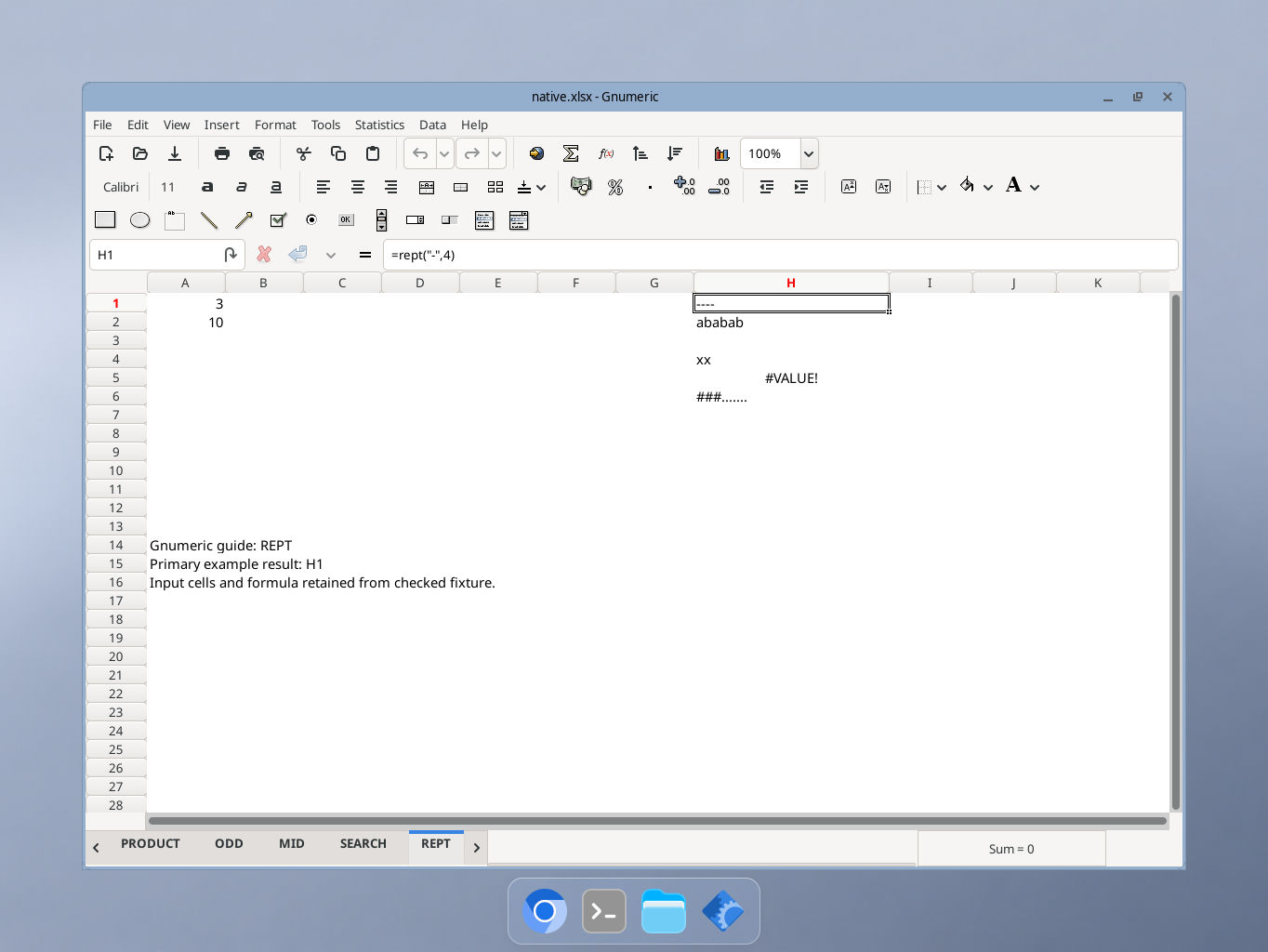
Gnumeric 1.12.57, captured 17 October 2026. The selected H1 cell shows the primary example result, with its formula in the formula bar. Other visible rows are supplemental fixture cases. General number formatting preserves floating-point tails; the GUI locale was not independently recorded. The hash characters in a supplemental text result are literal output, not a column-width warning.