

SEARCH Function (Gnumeric)
Locate text in Gnumeric with SEARCH, case-insensitive positions, optional start offsets and identifier extraction examples.
Verification status: Gnumeric 1.12.57 ssconvert bounded SEARCH fixtures, with a separate primary-example GUI capture; retained 1.12.62 source inspected separately. How formula examples are checked
SEARCH returns the starting character position of a match within text. Matching is case-insensitive and supports spreadsheet wildcards. It returns a number on success and an error on failure, so it should not be used as though it directly returned TRUE or FALSE.
Syntax and defaults
=SEARCH(search,text[,start])
search is the required text or wildcard pattern to look for, and text is the required string to examine. Optional start defaults to 1. Positions are one-based. The returned position is measured from the beginning of the original text, even when searching begins later.
A question mark matches one character; an asterisk matches a sequence of characters, including an empty sequence. Prefix a literal asterisk or question mark with a tilde: ~* and ~?. These are spreadsheet wildcard patterns, not regular expressions. Do not copy a regular-expression pattern into SEARCH and assume the same interpretation.
Worked example
The retained formula =SEARCH("Cat","bobcat") returns 4. The difference in case is ignored, and the matching “cat” begins at the fourth character.
Put North-00427-UK in A1:
| Formula | Expected result |
|---|---|
=SEARCH("-",A1) |
6 |
=SEARCH("-",A1,7) |
12 |
=SEARCH("~*","A*B") |
2 |
=SEARCH("b?t","rabbit") |
4 |
In the second formula the search begins after the first delimiter, but the answer is 12, not a position relative to the substring beginning at 7. The wildcard example matches the last three characters “bit”; the question mark consumes “i.”
Advanced use: extract an identifier after a delimiter
For the A1 label, =MID(A1,SEARCH("-",A1)+1,5) returns 00427. SEARCH identifies the field boundary and MID extracts a known-width field. This is more robust than hard-coding the start position when the prefix length changes.
If an identifier may legitimately lack a hyphen, decide how that condition should be reported. A visible “Check identifier” fallback can make an exception obvious; silently returning empty text can make a bad identifier appear to be missing data. For presence testing alone, use =ISNUMBER(SEARCH("-",A1)), which is TRUE for this example. Keep the search pattern and the expected field rules documented together.
A starting position can also skip an earlier occurrence. To find the next hyphen after the first, construct the start as the first result plus one. Ensure the first search succeeded before interpreting the second; otherwise the original error is the useful diagnostic.
Errors and practical checks
- A missing match returns
#VALUE!, as in=SEARCH("z","abc"). - A start below 1 is invalid. A start beyond the searchable text also cannot locate an ordinary nonempty pattern there.
- Case-insensitive matching means “Cat” and “cat” are not distinguished. Use a case-sensitive search function if that difference is part of an identifier’s meaning.
- Escape wildcard characters when they should be literal. Searching for
*without escaping does not mean “find an asterisk character.” - Whitespace remains significant. An extra space in a pattern or source can alter the match.
- Unicode text can contain combining sequences whose displayed positions differ from a simple visual count. The bounded examples here verify ordinary ASCII and do not establish every Unicode case-folding rule.
Availability and version history
- Introduced: 0.27, listed in the official NEWS addition record.
- Availability: Supported in Gnumeric 1.12.62, based on the function-specific registration.
- Scope: Desktop; the fn-string function module must be included and enabled.
- Source provenance: Official 1.12.62 source retained October 13–14, reexamined October 17, 2026. No new native execution of that release.
Related functions
Official sources
Native verification scope
On 17 October 2026, Gnumeric 1.12.57 ssconvert recalculated 8 bounded SEARCH fixtures in C.UTF-8. The retained original example and additional fixture outputs matched their independently checked text/position expectations, including the explicitly tested error and empty-string cases where listed. These fixture records are engine evidence; the separate primary-example GUI capture below does not certify untested Unicode sequences, size extremes or other versions. Explanatory combinations not present in those fixtures are logical checks, not claimed additional native runs.
Native application screenshot
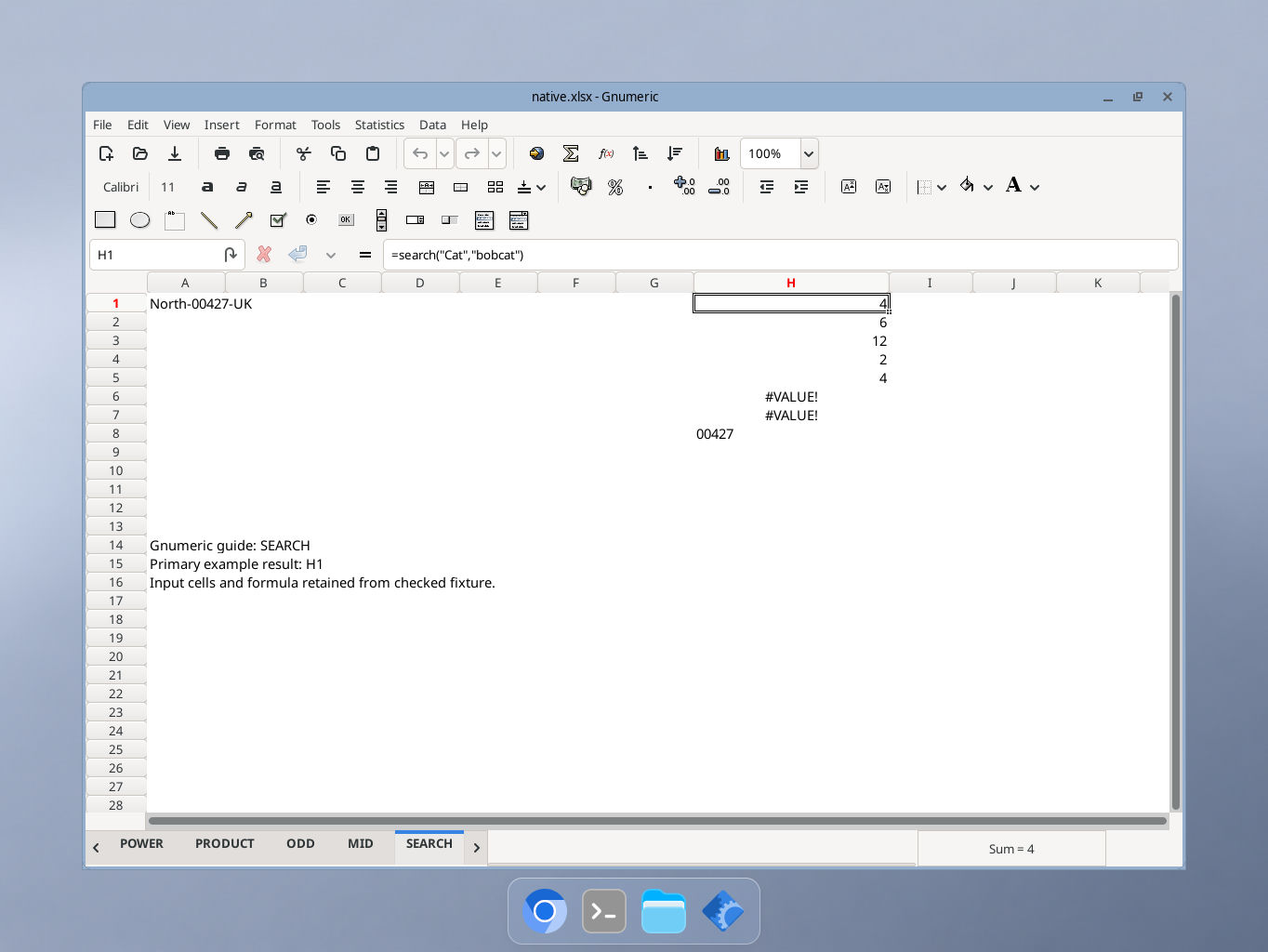
Gnumeric 1.12.57, captured 17 October 2026. The selected H1 cell shows the primary example result, with its formula in the formula bar. Other visible rows are supplemental fixture cases. General number formatting preserves floating-point tails; the GUI locale was not independently recorded.