

Gnumeric Weekly Hours Tracker Template
Record one interval per day, subtract unpaid break minutes and total a seven-row week. This original practice workbook includes live formulas, five fictional shifts and two unused rows. Clear the sample inputs to reuse it; you do not need to rebuild the calculations.
Use it only for intervals shorter than 24 hours, with no clock change during an interval. An end time earlier than its start is assumed to mean the next day. That assumption can also conceal a typing mistake, so the workbook flags every such row for confirmation. It does not calculate wages, overtime, statutory breaks or payroll compliance.
Download the workbook
| Format | Download size | Intended use |
|---|---|---|
| Native Gnumeric workbook (.gnumeric) | 3,688 bytes | Open and reuse in Gnumeric |
| XLSX workbook (.xlsx) | 8,121 bytes | The same exercise in an exchange format, recalculated in Gnumeric |
Both files have one Weekly hours sheet and 23 formula cells. They contain no macros or external data connections. The XLSX extension is not a claim that this workbook has been tested in Excel, LibreOffice Calc or other receiving applications.
Calculation was checked with the free Gnumeric 1.12.62 / GOFFICE 0.10.61, using its command-line converter on Debian 13 x86_64 Linux, C.UTF-8 locale and UTC. Native GUI opening, keyboard entry, printing and interface screenshots were not tested for this download.
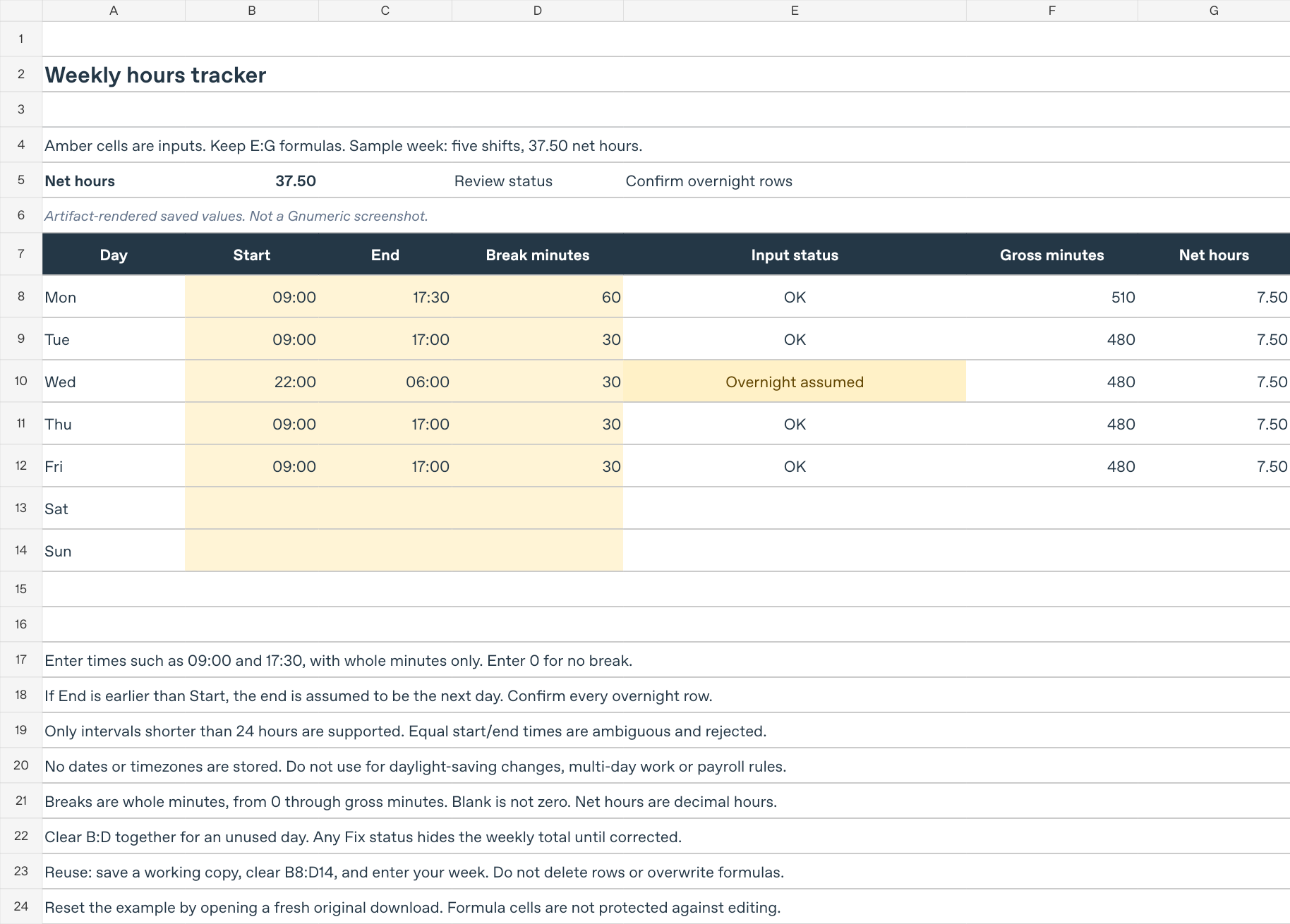
The preview renders checked saved values in a separate preview copy. The downloads retain their live formulas. It is not a screenshot of Gnumeric and does not establish native font or window rendering.
Start with the supplied example
- Save a working copy, keeping the original download unchanged.
- Open Weekly hours. The total is in B5 and the review message is in E5.
- Edit only the amber input cells B8:D14. B is Start, C is End and D is Break minutes. Keep the formulas in E:G and the summary cells.
- For times, use entries such as
09:00and17:30, at whole-minute precision. Breaks are ordinary whole numbers: enter30for half an hour or0for no break, not00:30,0.30or30%. - Confirm that B5 displays 37.50 before changing the sample. E5 should say Confirm overnight rows, because Wednesday crosses midnight under the template’s next-day assumption.
| Day and row | Start | End | Break minutes | Gross minutes | Net decimal hours |
|---|---|---|---|---|---|
| Monday, 8 | 09:00 | 17:30 | 60 | 510 | 7.50 |
| Tuesday, 9 | 09:00 | 17:00 | 30 | 480 | 7.50 |
| Wednesday, 10 | 22:00 | 06:00 next day | 30 | 480 | 7.50 |
| Thursday, 11 | 09:00 | 17:00 | 30 | 480 | 7.50 |
| Friday, 12 | 09:00 | 17:00 | 30 | 480 | 7.50 |
Saturday and Sunday have no input values. Their calculated fields stay blank; they are not zero-length shifts. The five populated rows give 5 × 7.5 = 37.5 hours. 7.50 decimal hours means 7 hours 30 minutes, not 7 hours 50 minutes.
To start your own week, clear the contents of B8:D14 together, leaving the sheet’s rows, formats and formula columns in place. An empty week shows No completed rows and a blank total. There is no date selector, second shift per day or automatic extension beyond these seven rows. The formulas are not protected against accidental replacement.
How the calculation works
Gnumeric represents a time of day as a fraction of a day. The template accepts numeric times from midnight, 0, up to but not including 1; it rejects full datetime serials. See the official TIME reference.
For valid start/end times, the underlying gross-minute calculation is:
=ROUND(MOD(C8-B8,1)*1440,0)
There are 1,440 minutes in a day. MOD(...,1) makes an earlier end time wrap into the next day. ROUND(...,0) removes floating-point residue at whole-minute precision; the status formula separately rejects inputs containing seconds rather than silently accepting them. The saved F8 formula also guards missing, nonnumeric and out-of-range times. The official MOD and ROUND documentation describes these functions.
G8 calculates (F8-D8)/60 only when E8 is OK or Overnight assumed. The weekly total is deliberately blank if any row begins with Fix:. Correct the input instead of summing the remaining valid rows as if the week were complete. The conditional branches use IF.
The displayed hh:mm format does not remove an underlying date or seconds. Read Gnumeric’s number and time formatting guidance, or the site’s number and date formatting tutorial, when a value looks right but fails the checks.
Understand the warnings
| Message in column E | What to check |
|---|---|
| Fix: 3 numeric inputs | Complete Start, End and Break with numeric values, or clear all three for an unused day. Text that looks like a time is not a numeric time. |
| Fix: times only | Remove dates and negative values. 24:00 is outside this time-only model; use 00:00 for midnight and confirm the intended interval. |
| Fix: equal times ambiguous | Identical times cannot distinguish no elapsed time from a full day. Clear an unused row; do not use this template for a 24-hour interval. |
| Fix: whole-minute times | Remove seconds, including seconds hidden by the display format. |
| Fix: break minutes | Use a whole number from zero through the gross interval’s minutes. A break equal to the interval is allowed and gives zero net hours. |
| Overnight assumed | Check that End really is on the next day and the whole interval is shorter than 24 hours. This warning does not suppress the total. |
The text checks remain the primary warning mechanism; do not rely only on colour. The total is not evidence that every day has been entered, that the overnight assumption is true or that formulas have not been overwritten.
Try a change and restore the example
In a working copy, change Monday’s C8 from 17:30 to 18:30. G8 should become 8.50 and B5 38.50. Restore C8 to 17:30 and expect 7.50 and 37.50 again.
Then change D8 to -1. E8 should read Fix: break minutes, G8 and B5 should be blank, and E5 should read Fix flagged rows. Restore the original break of 60. Clearing D8 alone also withholds the total because a missing break is not assumed to be zero.
These calculations were executed through Gnumeric’s CLI, including cacheless XLSX re-import, both downloads’ calculation paths, midnight start/end values, blank rows, incomplete inputs, equal times, excessive/fractional/negative breaks, hidden seconds, a populated last row and restoration of the original cell values and formulas. That is calculation and serialization evidence, not a claim of tested GUI Undo or save-dialog behavior. Open a fresh original download if you are unsure what was changed.
Limits and related downloads
This time-only model cannot identify a daylight-saving transition, a wrong date or an interval of 24 hours or longer. Use a separately verified full-datetime workflow for those cases, rather than forcing them into the next-day assumption. Local times alone are insufficient to resolve a repeated or skipped hour.
The example’s original amounts and independent minute arithmetic were checked separately from the Gnumeric runs. The supplied XLSX caches contain Gnumeric’s results. Other calculation/rendering engines were not accepted as evidence of receiving-application compatibility.
For other exercises, use Gnumeric starter files. For keeping an untouched master and reusable copies, see create and reuse a workbook template.
Download integrity
SHA-256 checksums identify these exact files, not a certificate of compatibility with untested programs:
weekly-hours.gnumeric
0bfa1cca3039cbc3e32da1c5942186700881db68a704e54365010933fd8cc9d3

weekly-hours.xlsx
e450bf1be3ec758f303f40d8c57f8a90b3b4e6beb6c871a9cf8d77edb74e39fe