

Gnumeric Starter Files and Practice Downloads
The two small synthetic CSV datasets below help you check an import before building a reusable Gnumeric workbook. They are plain CSV files, not ready-made native templates: neither CSV contains saved formulas, macros, formatting or multiple sheets. The separate ASC practice workbook is an XLSX download with live formulas and saved calculation results. The weekly-hours downloads below provide a separate reusable native workbook and XLSX copy. Use these files with the free Gnumeric desktop application; no paid edition is required.
Choose the right starter
| Download | Size | Best use |
|---|---|---|
| Three-month expense data (CSV) | 86 bytes | Simple comma-separated integer amounts for adding and checking totals |
| Decimal commas and text codes (CSV) | 68 bytes | Semicolon separation, UTF-8 accents, decimal-comma interpretation and preserving leading zeros |
| ASC formula practice (XLSX) | 6,027 bytes | Converting fullwidth supplier labels and preserving leading-zero text with four live ASC formulas |
| Weekly hours tracker (native Gnumeric) | 3,688 bytes | Reusing seven daily input rows with live formulas and a supplied 37.50-hour example |
| Weekly hours tracker (XLSX) | 8,121 bytes | The same exercise recalculated in Gnumeric; other receiving applications untested |
Both CSV files are UTF-8 text with a header plus three records, but their import settings are different. Do not reuse the same delimiter automatically. The expense file’s shared folder records its original use in Calligra lessons, not an application restriction. No extra copy is needed for Gnumeric.
Simple expenses: contents and acceptance checks
The complete expense file is:
Category,January,February,March
Travel,120,90,110
Supplies,35,45,40
Training,80,20,60
Import into a blank sheet starting at A1, including the header. Expect four columns through D and four rows. These are illustrative amounts without a specified currency or tax model, not a complete accounting workbook.
Use UTF-8, separated fields and comma as the separator, with double quote as the text delimiter. Include all columns; Category may be Text and the three month columns General. The integer amounts do not require the decimal-comma locale used by the second download.
Add checks in unused cells:
| Formula | Expected result |
|---|---|
=COUNT(B2:D4) |
9 |
=SUM(B2:B4) |
235 |
=SUM(C2:C4) |
155 |
=SUM(D2:D4) |
210 |
=SUM(B2:D4) |
600 |
Travel, Supplies and Training total 320, 120 and 160 respectively. Changing B2 from 120 to 125 should change January to 240 and the grand total to 605. Restore 120 after the test. These checks were calculated independently from the file, not newly executed in Gnumeric.
Decimal commas and codes: contents and acceptance checks
The complete second file is:
Item;Amount;Code
Café;12,50;00123
Paper;7,25;00456
Ink;10,25;00789
Choose semicolon, not comma, as the field separator. The commas belong to the amounts. Select a numeric source locale that interprets them, such as Germany (de_DE), and keep Amount General. Set Code to Text before importing, so the codes stay five characters long. Check that Café remains readable.
With the header in row 1, expect A1:C4. =COUNT(B2:B4) should return 3, =SUM(B2:B4) should return 30, and =LEN(C2) should return 5. C2:C4 should be 00123, 00456 and 00789. A number format that displays zeros is not a substitute for preserving the original identifier as text.
Use the complete delimiter and decimal-comma import guide for the panel-by-panel procedure and its existing screenshots. That guide records a native run in Gnumeric 1.12.57 on Debian 13.6, not a new test of this catalogue or of later versions. Its saved example workbook is linked there with its original verification limits.
ASC formula practice: workbook and checks
Download the ASC practice workbook (.xlsx) to try width conversion without building the example sheet yourself. Unlike the CSV files above, it contains four live formulas and saved results calculated by Gnumeric.
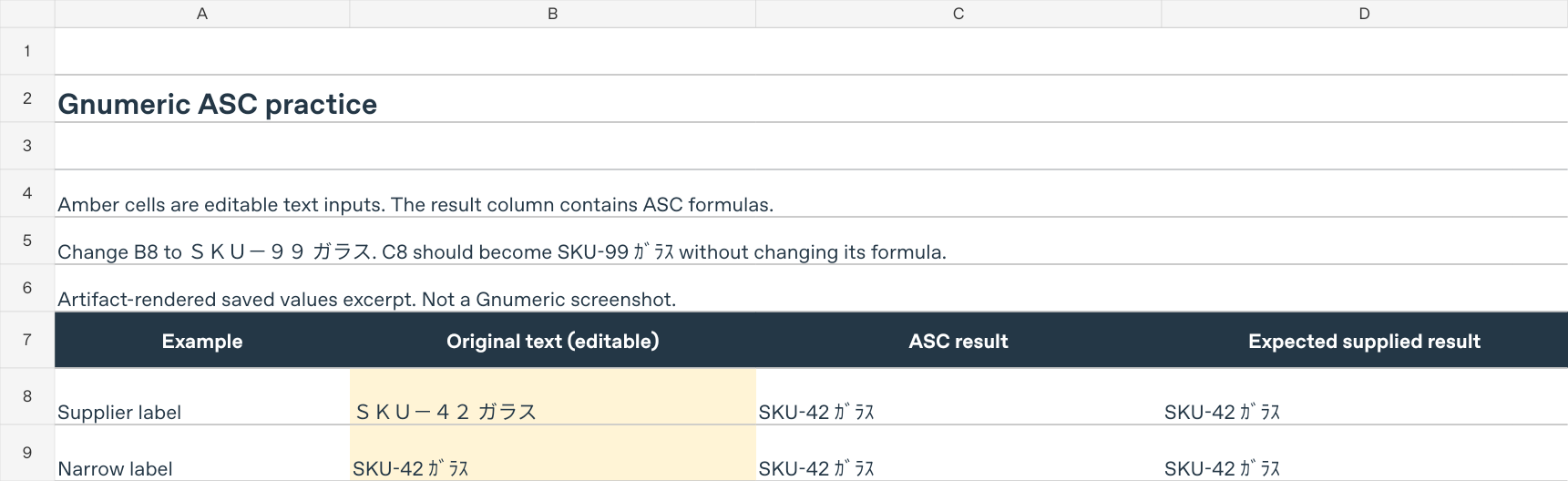
- Open a working copy and select ASC practice. Inputs are B8:B11; formulas are C8:C11. Column D contains fixed expected results for the supplied inputs, not your later edits.
- Check B8,
SKU-42 ガラス, and C8,=ASC(B8), whose supplied result isSKU-42 ガラス. - Change B8 to
SKU-99 ガラスand recalculate, leaving C8’s formula unchanged. C8 should becomeSKU-99 ガラス; D8 intentionally keeps the original expectation. - Clear B8’s contents, not the worksheet row, and recalculate. C8 should return an empty string, not
0. - Reset by opening a fresh copy of the download. Do not rely on GUI Undo as a tested reset method. Keep rows 10 and 11 as text: fullwidth
0012and stored text0012should both produce text0012.
The baseline, changed-label, blank and fresh original-input cases were checked using Gnumeric 1.12.62 / GOFFICE 0.10.61 on Debian 13 Linux x86_64, through CLI recalculation with C.UTF-8 and UTC. These are calculation and saved-XLSX checks, not GUI entry, native screenshot, other-locale or other-program tests. No new native run was performed for this catalogue amendment. See the complete ASC function guide for character-mapping limits, locale effects and troubleshooting.
View the saved-values preview (PNG, 95,719 bytes). It is an artifact-rendered excerpt of the supplier-label rows, not a Gnumeric screenshot. The excerpt stops at row 9 because the preview renderer misdisplays leading-zero text in lower rows; the downloadable workbook retains the correct stored 0012 strings. Its fonts and gridlines do not establish Gnumeric’s GUI appearance.
SHA-256 of the exact files:
- ASC workbook:
128f1189775c3cfa9e4cf61fab2422dc0a9df3d4931d599f712df18a152f30ea - Saved-values preview:
21ebfd0c63542c2b357d5a1a5ff0a4788fe98bfd638c67b480a51880441e191b
Weekly hours: reusable workbook and checks
The weekly-hours tracker guide explains both downloads, their integrity hashes and the artifact-rendered saved-value preview. The preview is not a Gnumeric screenshot. Each workbook contains one Weekly hours sheet and 23 live formula cells, with no macros or external data connections.
Keep an untouched original. In a working copy, the supplied five shifts total 37.50 decimal hours in B5. Edit only B8:D14 for Start, End and whole-number Break minutes; preserve formulas in E:G. Changing Monday’s C8 from 17:30 to 18:30 should produce 38.50 in B5; restoring 17:30 returns 37.50. Clearing all input contents prepares an empty week, while an incomplete or invalid row withholds the total rather than silently treating it as complete.
Use this time-only model for intervals shorter than 24 hours with no clock change. An earlier end is assumed to be next day and requires confirmation. It does not calculate wages, overtime or payroll compliance. Read the guide’s input warnings before reuse.
Both formats’ calculation paths, input mutations, restoration and cacheless XLSX re-import were checked through Gnumeric 1.12.62 / GOFFICE 0.10.61 on Debian 13 x86_64 Linux, C.UTF-8 and UTC. These are CLI calculation and serialization checks, not GUI entry, printing, save-dialog or other-application tests. This catalogue amendment adds links and summaries; it does not claim another native run.
CSV import scope and safe next steps
The CSV import guidance uses the Gnumeric 1.12 manual, checked October 21, 2026, and the existing version-scoped import guide. The guide’s tested entry route is Data → Import Data → Import Text File. The manual also describes File → Open with the configurable text importer; availability and dialog wording can vary by package. See versions and availability for current platform scope. No fresh native application run, screenshot or save/reopen test was performed for these CSV catalogue checks; the separate ASC workbook has the CLI verification described above.
Inspect the preview before finishing. One long column points to a separator mismatch; split decimal amounts indicate comma was incorrectly enabled for the semicolon fixture. A low COUNT means some values may still be text. Re-import with the right settings rather than hiding the problem with display formatting. If codes lost zeros, restart from the untouched CSV with Code set to Text.
Save a separate .gnumeric working copy to retain added formulas and formatting. Keep the original CSV unchanged. For a reusable master rather than an import exercise, follow create and reuse a Gnumeric workbook template. That workflow uses a clean native workbook and a new working copy, not a CSV renamed as a template.
File integrity and official reference
The two exact CSV downloads were inspected on October 21, 2026. Neither CSV contains formula-triggering cell prefixes or external links. SHA-256 identifies the original bytes; it does not prove import success:
- Expense data:
50ceb3d2d14be65e500e758c046a8e3413f3a17f869e10973aa7c63b79ecf986 - Decimal commas and codes:
bb9e5c53791bc32d8f113b54b48c6a823d1a17c58120cfe9adc7ec11fa93b361
The official Importing Text Files manual explains encoding, separators, source locale and per-column formats. The CSV numerical results above were independently checked; run the acceptance checks on your installation before relying on an imported workbook.