

Google Sheets Starter Files and Practice Downloads
Choose the practice file by its purpose
The seven workflow downloads in this table are synthetic data-only text files, not Google template-gallery entries. They contain no formulas, formatting, named ranges, saved views, sharing permissions or connected data sources. Five grouped statistics inputs appear separately below. The separate workbook below includes formulas and formatting. Original links are reused from their owning lessons, rather than duplicating the files.
| Download | Size | Purpose |
|---|---|---|
| Four-record work queue (CSV) | 104 bytes | Check numeric imports and a simple Open/Closed/Waiting selection |
Original product IDs (CSV text, .txt) |
98 bytes | Keep the exact original identifier strings for comparison |
Prefixed product IDs (CSV text, .txt) |
112 bytes | Import the controlled transport fixture using the linked ID lesson |
| January QUERY input (CSV) | 96 bytes | Four identified records, a blank row and a valid zero amount |
| February QUERY input (CSV) | 84 bytes | Three identified records and a blank row for the two-month report |
| IMPORTRANGE source records (CSV) | 61 bytes | Three local input records; no connection or access permission |
Shared-order records (CSV text, .txt) |
190 bytes | Six orders for the filter-view lesson; no saved or shared view |
Import the queue without replacing existing work
Scope: Google Sheets in a computer web browser, a rolling service checked October 21, 2026. Google’s product page says anyone with a Google Account can create spreadsheets; some additional capabilities require Workspace plans. This exercise does not require a paid plan. No account was created or signed-in import performed for this catalogue.
Google’s import instructions document File → Import, supported CSV/TXT files, separator choice and import destinations. Choose the queue CSV, use Comma for its separator and Create new spreadsheet or Insert new sheets, not a replace option that would overwrite needed data.
With its header at A1, the queue should occupy A1:D5:
| RecordID | Owner | Status | Hours |
|---|---|---|---|
| R-201 | Alma | Open | 3 |
| R-202 | Ben | Closed | 5 |
| R-203 | Cleo | Open | 8 |
| R-204 | Dara | Waiting | 2 |
Add =COUNT(D2:D5) in an unused cell: expect 4. =SUM(D2:D5) should return 18. A correct sum alone does not prove each imported value is numeric, so use both checks.
The Open subset is R-201 and R-203, with 11 hours; Closed has 5 and Waiting 2. For a change test, change D2 from 3 to 4: the total becomes 19 and Open hours 12. Restore 3 afterward. The FILTER range-size troubleshooting lesson uses this queue to show why data and condition ranges must stay aligned. The CSV itself contains no FILTER formula or live queue integration.
Use the identifier pair as a different exercise
Both identifier files contain three columns, a header in row 1, and four data records in rows 2–5. Their quantities are 2, 3, 4 and 5, totaling 14. The original identifiers are exactly 000123, 12345678901234567890, 03-04 and 1E10. They are labels, not numbers or dates to calculate with.
The transport file adds ID: before each identifier and changes the first heading to TransportID. Save a separate copy of that .txt download as product-ids-transport.csv, as directed by preserve product IDs with a text transport copy. These bytes already contain comma-separated text; changing that filename suffix is not creating a native workbook.
Follow the complete lesson for extraction and exact comparisons. After correctly removing only the added three-character prefix, the ID lengths should be 6, 20, 5 and 4. Compare the full strings too: a correct length alone can hide an incorrect digit. Do not open and resave the authoritative original through a spreadsheet before comparing it.
Combine two months without losing a header or a zero
Use the January and February QUERY input CSVs together. Both are UTF-8 comma-separated, data-only files with RecordID, Month, Region and Amount columns. They contain no sheet tabs, QUERY formula or completed report. In an already authorized free Google account’s web app, follow combine tabs with QUERY and keep one header to create separate Jan, Feb and Report tabs. Do not replace an existing spreadsheet during import.
Place January at Jan!A1:D6 and February at Feb!A1:D5, retaining the intentional empty row 4 in each. Keep RecordID text and Month and Amount numeric. Check the inputs before building the report:
| Input | Identified records | Amount total | Important exception |
|---|---|---|---|
| January | 4 | 250 | J-103 has blank Region; J-104 has a valid zero Amount |
| February | 3 | 180 | Row 4 is empty, not a record |
| Combined | 7 | 430 | Every identified record must survive once |
Follow the lesson’s one-header QUERY formula and reconcile every ID, not just the amount total. Filtering out blank Region would lose J-103; excluding zero amounts would lose J-104 without changing the total. For its growth test, first switch to the lesson’s open-ended formula, then enter F-204, 2, North, 45 in Feb!A6:D6. Expected results become four February records totaling 225, eight combined records totaling 475, and one report header. The original bounded formula stops February at row 5 and intentionally misses that added record. Restore the practice data after testing.
Verification boundary: these are independently computed file and arithmetic checks plus the owning lesson’s first-party documentation, not native Google Sheets import, QUERY execution or save/reopen evidence. No account was created or authentication performed. The web workflow does not establish mobile or paid Workspace feature parity.
Prepare source records without granting a connection
The IMPORTRANGE source CSV contains RecordID, Team and Units in A1:C4: P-301/Blue/12, P-302/Green/7 and P-303/Blue/4, totaling 23. It is a local input fixture, not a connected spreadsheet. It does not create the Data tab, a destination formula or any permission.
Follow IMPORTRANGE access diagnosis and its synthetic exercise only in files you are authorized to use. That owner explains source access, destination audiences and connection approval; keep permission decisions there rather than treating a downloaded CSV as authorization. Do not publish a source or bypass an account or administrator restriction to make the exercise work.
The lesson’s controlled change is source Data!C4 from 4 to 9: the expected imported last record becomes P-303/Blue/9 and total 28, then returns to 23 after restoration and a successful update. These are arithmetic expectations, not observed refresh results or a timing promise. Compare all records, since a total cannot detect swapped IDs or teams. No account, connection or live refresh was exercised for this catalogue.
Shared orders: raw records, not a saved view
The shared-orders.txt file is comma-delimited UTF-8 despite its suffix. It contains the five headings Order, Region, Product, Amount, Status and six records in A1:E7, totaling 670. Follow filter a shared sheet without changing coworkers’ views for setup in an authorized practice file, including its copy-or-save-as-CSV option. The file does not supply a view, collaborator access or a safe private editing sandbox.
Expected East/Open records are 1003 then 1001 when sorted by descending Amount, totaling 280. Expected North/Open records are 1004 and 1006, totaling 165. Keep all six originals; filtering is not deletion. The owning lesson’s shared-view, clipboard, named-view persistence and simultaneous-collaborator workflows remain untested here. Do not infer that another person’s view stayed unchanged from these independent subset totals.
Five statistics inputs for eight function guides
The eight existing function CSV URLs represent five byte-distinct fixtures, not eight different templates. Each row below links one unchanged representative; the matching function guides retain their original links. LARGE/SMALL, STDEV.P/STDEV.S and VAR.P/VAR.S each share identical input bytes within their pair.
| Raw CSV input | Bytes | Follow these guides | Extra numeric observations in column F |
|---|---|---|---|
| Order-statistic input | 116 | LARGE and SMALL | F2:F6: -8, -3, 0, 6, 6 |
| Standard-deviation input | 113 | STDEV.P and STDEV.S | F2:F5: 0, 0, 8, 8 |
| Variance input | 115 | VAR.P and VAR.S | F2:F5: 0, 0, 80, 80 |
| Median input | 114 | MEDIAN | F2:F5: 0, 2, 8, 10 |
| Competition-rank input | 109 | RANK.EQ | No extra F observations |
Use a separate blank sheet for each chosen fixture, with its header at A1. Every file occupies A1:F8: observations 8, 12, 10, 9, 12, 15, 7 are in A2:A8, record numbers 1–7 in B2:B8, and requested position 3 in D2. Keep blank spacer columns C and E so the lesson addresses still match. These files have no formulas, named ranges or completed results. Real zeros in F are observations, not missing cells.
Add checks outside the input rectangle. With seven numeric observations in A2:A8, the independently calculated expectations are:
| Formula or check | Expected result |
|---|---|
=LARGE(A2:A8,D2) / =SMALL(A2:A8,D2) |
12 / 9 at position 3 |
=MEDIAN(A2:A8) |
10 |
=STDEV.P(A2:A8) / =STDEV.S(A2:A8) |
Approximately 2.555506 / 2.760262 |
=VAR.P(A2:A8) / =VAR.S(A2:A8) |
320/49 ≈ 6.530612 / 160/21 ≈ 7.619048 |
=RANK.EQ(A2,$A$2:$A$8,0) filled down |
6, 2, 4, 5, 2, 1, 7 |
Population variance divides squared deviations by 7; sample variance by 6. Standard deviations are their square roots. Choose sample versus population from the intended question, not whichever result looks preferable. Both 12s receive descending rank 2, so the next lower value receives 4, not 3; ranks are not unique record identifiers.
For the separate F controls, LARGE/SMALL at position 2 give 6 / -3; population/sample standard deviations give 4 / approximately 4.618802; population/sample variances give 1600 / approximately 2133.333333; MEDIAN gives 5. Use only the corresponding fixture’s F range. These numeric models do not establish mixed-text coercion, error codes, import, formula entry or recalculation in Google Sheets. Follow each owning guide for the full experiment and scope.
Reuse the existing formula-based workbook
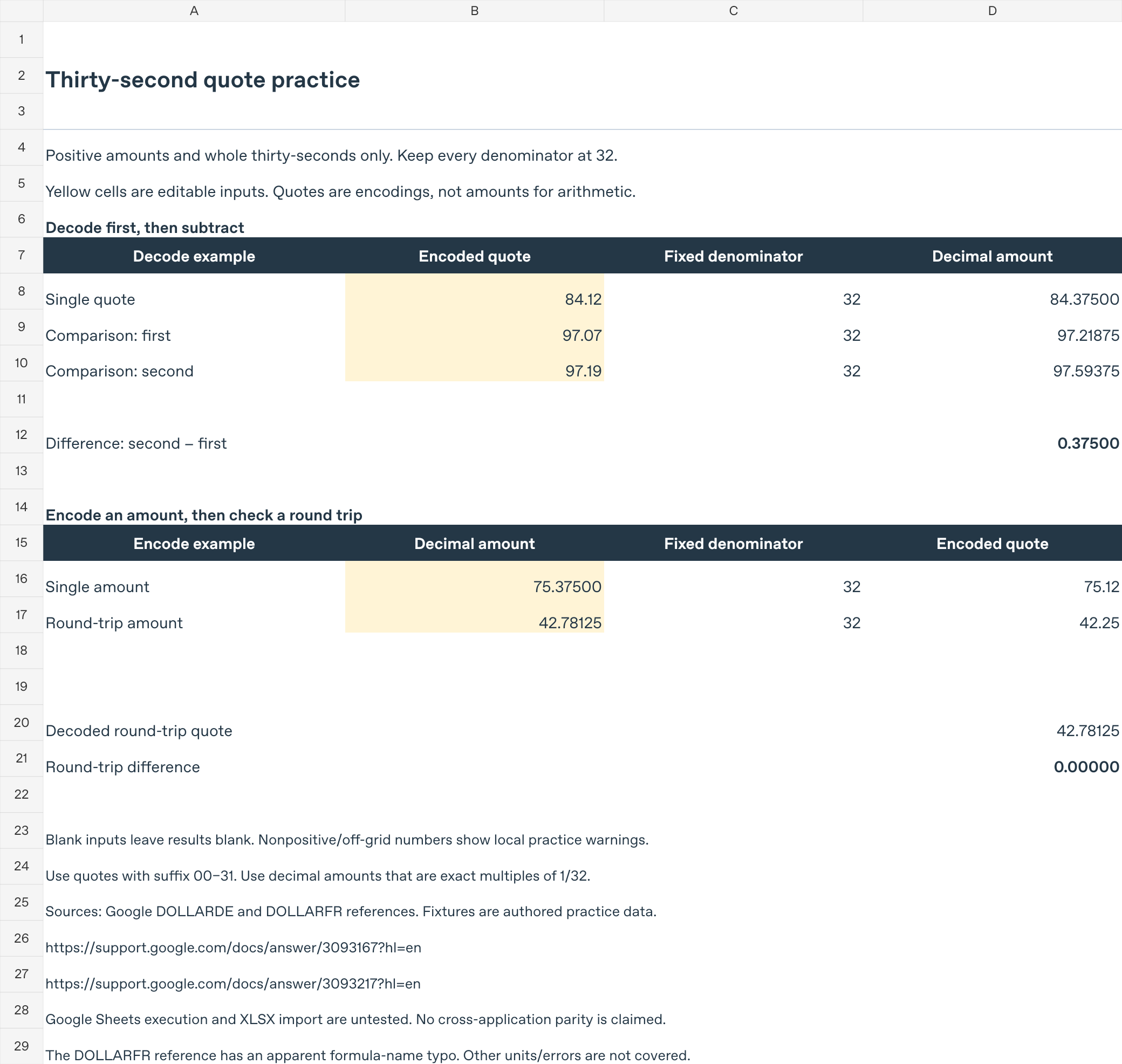
Download the thirty-second quote practice workbook (.xlsx) for a different task: decode positive fractional quote encodings, compare the resulting amounts, and encode an exact multiple of 1/32. This is a real, existing single-sheet workbook, not a CSV renamed to .xlsx or a hosted Google template. Its owners are the DOLLARDE lesson and DOLLARFR lesson; follow those lessons for the full input contract and source limitations.
On the Thirty-seconds sheet, edit only yellow input cells and leave every denominator at 32. With B9 = 97.07 and B10 = 97.19, D9 and D10 should be 97.21875 and 97.59375, and D12 should be 0.375. Independently, the suffix difference is 19 − 7 = 12, and 12/32 = 0.375. Change only B10 to 98.00: expect D10 = 98 and D12 = 0.78125. Restore 97.19. Do not subtract encoded quotes as if they were ordinary decimal amounts.
For the encoding exercise, B17 = 42.78125 should produce D17 = 42.25, D20 = 42.78125 and D21 = 0. Change B17 to 42.96875: expect 42.31, 42.96875 and 0, respectively. Restore B17 afterward. These are positive whole-thirty-second practice inputs, not a contract for arbitrary text, negative values or other denominators.
Google’s computer import instructions list non-password-protected XLSX files. In an already authorized account, use File → Import and choose a new spreadsheet when offered, not replacement of existing work. Available import destinations depend on file type. After importing, run both change tests above, then save/reopen and check them again before using it as a reusable Sheets master.
Verification boundary: the file and its formula/cached-value structure were inspected October 23, 2026. The owning lessons report prior artifact-tool and LibreOfficeDev checks; those are not Google Sheets execution. No new Google Sheets import, recalculation, native save/reopen or receiving-Excel execution was performed here. The existing preview is artifact-rendered, not an application screenshot. Its availability and valid XLSX structure do not clear the native Sheets usability check. Treat this as a downloadable practice candidate, not a verified native Sheets template.
Keep a reusable master, not a misleading CSV template
Keep an unchanged download and a separate clean Sheets master. Make another copy for edits or larger experiments. Once you add formulas or formatting, do not expect a CSV download to preserve those workbook features. A text-preserving exercise does not prove arbitrary exports are lossless: inspect a receiving file again before relying on it.
Downloading and inspecting the raw inputs does not create or require a cloud connection. The optional IMPORTRANGE and shared-view exercises require the separate authorization checks in their owning guides; do not expand sharing or publish a source merely to complete a practice task. See versions and availability for browser, mobile and offline distinctions; this catalogue does not claim mobile import parity.
File integrity and verification
The three text-download bytes were originally inspected on October 21, 2026 and rechecked October 23. Those synthetic UTF-8, comma-separated files contain no formulas, macros or external links; this statement does not describe the formula-based XLSX above. A SHA-256 match identifies unchanged bytes, not a successful application import.
- filter-queue.csv: 104 bytes; SHA-256
5b06e187ccc84c977b6514804b4a3fdac5a397c0349d917f5693b840c1f826f2. - product-ids-original-v2.txt: 98 bytes; SHA-256
7f4aa7fd9c1fdbee979c9f0397498a222396dc78247a0341e4f2678ea8d7ad61. - product-ids-transport-v2.txt: 112 bytes; SHA-256
0e3d2709d42f003cedcd69732f2597982cd7cf35992daf0be40390694ef45497.
Expected results were calculated independently from the files. No new application import, save/reopen test or screenshot was produced for this catalogue. Check results in your own environment before adapting the examples to important data.
The additional practice downloads above were byte-checked on October 24, 2026; their files were not modified:
- query-feb.csv: 84 bytes; SHA-256
115f8a542cd078d5749a9b6981b33f982a8a254b2954927bbd24db82a6ffcc7a. - query-jan.csv: 96 bytes; SHA-256
87616280d1da86756c9611cf338eae5cc065af1b37736a105986017aaeacf542.
The newly catalogued workflow inputs and five representative statistics fixtures were independently rechecked on October 25, 2026; all original files, including the identical-byte alternate URLs, were unchanged:
- importrange-source.csv: 61 bytes; SHA-256
895633d1438b872a9656a2f402013b9a718a0f1b0198dbfa3f0b2342f1c5e36a. - shared-orders.txt: 190 bytes; SHA-256
8445281bb0661eeabda9bfb0b8ce3f65da08ffce38a7ad195afd69724eb0883e. - google-sheets-large-data.csv: 116 bytes; SHA-256
d2d8014811feb0963c3fd1ebc64e582dace5b5d110314667b569cc9db752da7b. - google-sheets-stdev-p-data.csv: 113 bytes; SHA-256
ddf5c2c2b8dee684397cd7ffff0cb18d111538642e9e16d5358b42b9d344ebfd. - google-sheets-var-p-data.csv: 115 bytes; SHA-256
8a0ff8306693f9a150cd740cadbe0193dc2e819bbe7894ce694120d6c269175f. - google-sheets-median-data.csv: 114 bytes; SHA-256
c991ba98527e91e4a2c5370023340448cd53d92b7c0749403c03adeeb8a4e17a. - google-sheets-rank-eq-data.csv: 109 bytes; SHA-256
6fd47563e58c9963b318325ecdfa1acb0bf952379ec5e36fcf797a2eb4c2d275.
Browser downloading was not verified in this review. Local file-byte, hash and link-target checks do not establish successful browser transport, signed-in import, clipboard behavior, permissions or shared-view operation.