

Inventory reorder workbook for LibreOffice Calc
Use this small, original workbook to compare stock on hand with your chosen reorder trigger. It suggests the quantity needed to reach a target only when stock is at or below that trigger. It does not place orders or choose appropriate stock levels for your business.
Download the editable files
Both contain one Inventory worksheet, four fictional examples and eight spare rows. They are ordinary workbooks, not registered .ots templates. Save a separate working copy before replacing the examples. Neither file contains macros, scripts or external workbook links.
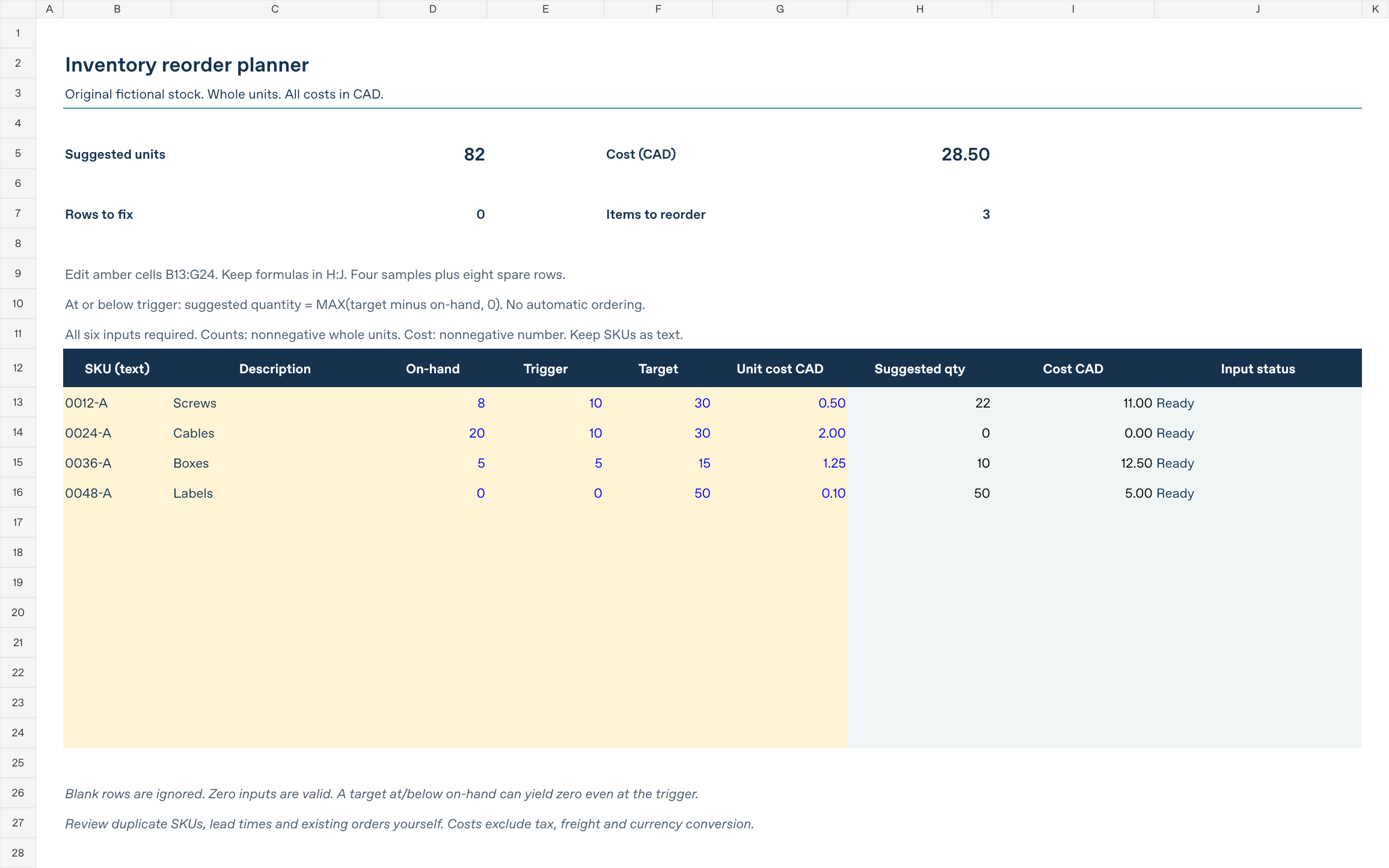
This is a rendered preview of the supplied workbook, not a screenshot of the LibreOffice application.
Enter your stock information
Edit the amber cells in B13:G24. Leave the formulas in H:J and the summary cells unchanged.
| Column | Enter |
|---|---|
| B | A text SKU, such as 0012-A. Leading zeros are meaningful. |
| C | A description. |
| D | Units currently on hand. |
| E | The stock level that triggers consideration of a reorder. |
| F | The stock level you would like to reach. |
| G | Unit cost in Canadian dollars (CAD). |
Counts in D:F must be nonnegative whole numbers. Unit cost must be a nonnegative number. Zero is valid, including zero stock, a zero trigger and a zero-cost item. Enter numbers as numbers, not quoted text. SKU cells use text formatting; preserve that format when pasting. For an all-digit identifier, enter it as text and verify that its leading zeros remain visible after saving and reopening.
Rows 17–24 are reserved for eight additional items. The summaries stop at row 24. Adding records below that row does not extend the formulas or summaries automatically. This starter is deliberately limited to twelve rows; it is not a stock-management database.
How the calculation works
For a complete, valid row:
- If on-hand is above the trigger, suggested quantity is zero.
- If on-hand equals or falls below the trigger, suggested quantity is
MAX(target − on-hand, 0). - Suggested cost is quantity multiplied by unit cost, rounded to two decimal places per row. The summary adds these rounded costs.
A target below the trigger is permitted. If the target is already met, the result is zero, even when the reorder condition is met. Check that this is the policy you intend.
The visible input status in J is part of the calculation, not a purchase approval. A completely empty input row is ignored. A partially filled row, text in a numeric field, negative input, fractional count or numeric rather than text SKU produces Fix inputs and n.a. outputs. While any row needs fixing, the quantity, cost and item-count summaries show n.a. rather than an understated total. Rows to fix counts the affected rows. Correct all six inputs on each flagged row or clear its B:G cells completely.
Duplicate SKUs are not detected or consolidated. Each row contributes independently, so review duplicates yourself. The workbook also does not account for supplier minimums, pack sizes, demand forecasts, lead times, reservations, incoming orders, tax, freight or currency conversion. Use a consistent unit of measure for each item’s counts and unit cost. Mixed-item unit totals are a simple count, not a measure of weight or value.
Check the supplied example
| SKU | Suggested units | Cost (CAD) |
|---|---|---|
| 0012-A | 22 | 11.00 |
| 0024-A | 0 | 0.00 |
| 0036-A | 10 | 12.50 |
| 0048-A | 50 | 5.00 |
The summary should show 82 units, CAD 28.50, 0 rows to fix and 3 items to reorder. These are fictional values, not supplier quotations.
In a disposable copy, change D13 from 8 to 12. That item is now above its trigger of 10, so the totals become 60 units and CAD 17.50. Change D13 to 10 to test equality: the totals become 80 units and CAD 27.50. Clearing D13 should show Fix inputs and unavailable totals, not a valid zero. Restore 8 when finished.
Verification and limitations
The XLSX was authored and rendered with a spreadsheet-generation tool. Its formulas and twelve input cases were checked, including threshold equality, blank versus zero, invalid inputs, an already-met target, the final spare row and an empty table. Independent arithmetic gives the sample totals above.
Native recalculation was tested using the freely available LibreOfficeDev 26.8.0.0.alpha0, build 2c87e51eeaa2b413ff4ae097b2705eea1995d8e5, on Linux in headless mode. Disposable XLSX test copies had formula caches removed before conversion; the newly calculated ODS results matched the expected cases. The ODS download was produced through that conversion path.
This is development-build, headless evidence, not testing in a stable LibreOffice release, Excel or a graphical interface. No application screenshot is provided. Inspect your saved working copy and repeat the sample checks in your own installed version before relying on it.
Related guidance and official references
- More starter downloads
- Make a reusable workbook template
- LibreOffice versions and availability
- Official LibreOffice Help: IF and AND, MAX, and ROUND and SUM. These explain the underlying functions; the stock policy and sample data here are original choices, not LibreOffice recommendations.