

Reading progress workbook for LibreOffice Calc
Use this original, twelve-book workbook to track pages read and pages remaining. It also illustrates a useful spreadsheet distinction: the percentage of all pages read is not generally the average of the individual books’ percentages.
Download the editable files
Both files contain one Reading worksheet with three fictional examples and nine empty book slots. They are ordinary editable workbooks, not registered .ots templates. Save a working copy before replacing the examples. Neither contains macros, scripts or external workbook links.
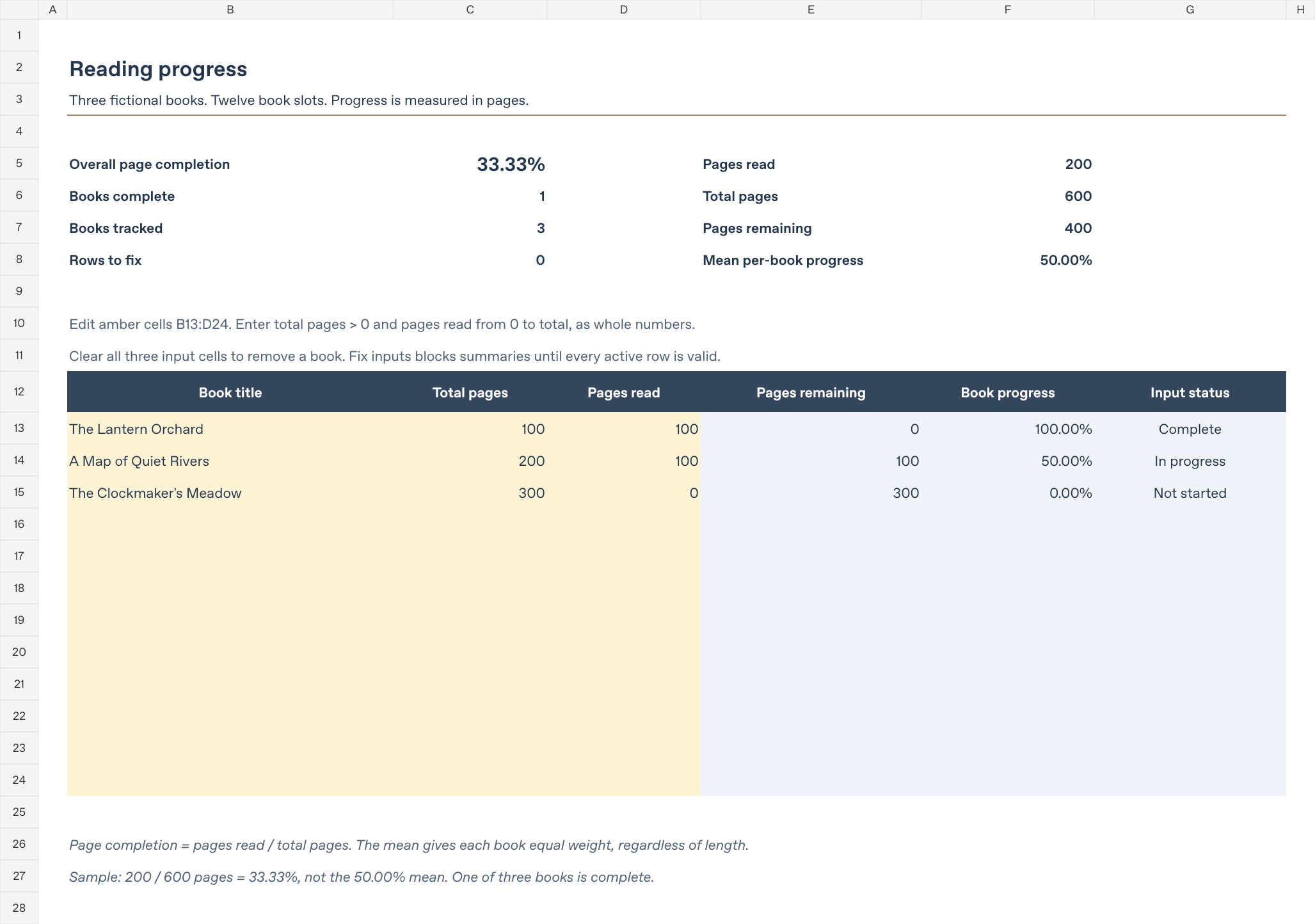
This is a rendered preview of the supplied workbook, not a screenshot of the LibreOffice application.
Enter your books
Edit only the amber input cells in B13:D24. Keep the formulas in E:G and the summary cells unchanged.
| Column | Input |
|---|---|
| B | Book title, entered as text. |
| C | Total pages: a positive whole number. |
| D | Pages read: a whole number from zero through the total pages. |
Use the page count for the edition you are reading. Enter 0 for a book you have not started; a blank pages-read cell means a missing input, not zero. To remove a book, clear all three input cells in its row, leaving the formula cells intact. Rows 16–24 provide the nine spare slots.
The workbook covers twelve rows only. Entries below row 24 are not included automatically. It does not track reading sessions, dates, goals, elapsed time or audiobook minutes. Each row is counted separately, so repeated titles are not merged or flagged. Page counts describe quantity, not reading difficulty or time required.
Understand the two percentages
The supplied example uses original fictional titles:
| Book | Pages read | Total pages | Book progress |
|---|---|---|---|
| The Lantern Orchard | 100 | 100 | 100.00% |
| A Map of Quiet Rivers | 100 | 200 | 50.00% |
| The Clockmaker’s Meadow | 0 | 300 | 0.00% |
Overall page completion divides total pages read by total pages: 200 ÷ 600 = 33.33%. The longer books contribute more pages to this denominator.
Mean per-book progress averages the three book percentages: (100% + 50% + 0%) ÷ 3 = 50.00%. It gives each book equal weight, regardless of length. It answers a different question and should not replace the page-weighted overall result.
The remaining summaries show 1 book complete, 3 books tracked, 400 pages remaining, and 0 rows to fix. A book is complete only when pages read equals total pages. Percentages are displayed to two decimal places; formulas retain the underlying precision.
Missing and invalid entries stay visible
A completely empty input row is ignored. A partially filled row, ordinary-space-only or non-text title, text in a numeric field, zero or negative total pages, negative pages read, a fractional page count, or pages read above the total produces Fix inputs in that row. Its calculated results become n.a..
While any row needs fixing, the page totals, book counts and both percentage summaries also show n.a.. This prevents incomplete data from silently producing an understated total. Rows to fix remains a numeric count of the affected rows. Correct the amber cells on each flagged row or clear all three input cells to remove it.
If every input row is empty, page totals and book counts show zero. Both percentages show n.a. because there are no pages or books to divide by. Warning formulas flag entries after calculation; they are not input-entry locks. Keep the formulas intact when pasting or clearing data.
Try two checks in a disposable copy
- Change D14 from 100 to 200. The second book becomes complete. Expect 300 of 600 pages read, 50.00% overall completion, 2 complete books, 300 pages remaining and 66.67% mean per-book progress.
- First restore D14 to its original value of 100. Then clear D13 while leaving its title and total pages. Expect Fix inputs, 1 row to fix and unavailable summaries. Entering 0 instead is valid: expect 100 of 600 pages read, 16.67% overall completion, 0 complete books and 500 pages remaining.
Restore the original values or reopen a fresh download when finished. If you use different editions or include front matter, choose a consistent counting convention for each book’s total and read pages.
Verification and limitations
The XLSX was authored and rendered with a spreadsheet-generation tool. Sixteen input cases were checked, covering the original sample, changed progress, a valid zero, missing input, invalid totals and counts, text numbers, overreading, title omissions, a removed book, the final available row, a partial final row and a fully empty table. An independent calculation reconstructed each case and compared its integer totals and percentage results with the native recalculation output.
Native recalculation used the freely available LibreOfficeDev 26.8.0.0.alpha0, build 2c87e51eeaa2b413ff4ae097b2705eea1995d8e5, on Linux in headless mode. Formula caches were removed from disposable XLSX copies while preserving inputs and formulas. Conversion then produced freshly calculated ODS results. The ODS download was produced by this conversion path.
This is development-build, headless evidence, not testing in a stable LibreOffice release, Excel or a graphical interface. No application screenshot is supplied. Repeat the sample checks in your installed version and inspect your saved copy before using it for your own records.
Related guidance and official references
- More starter downloads
- Make a reusable workbook template
- LibreOffice versions and availability
- Official LibreOffice Help: IF and AND, mathematical functions including SUM, and information functions including ISNUMBER and ISTEXT. These describe underlying functions. The workbook design, fictional titles and sample page counts are original examples, not LibreOffice templates or recommendations.