

SUMSQ Function (Gnumeric)
Sum squared numeric inputs with Gnumeric SUMSQ, using residual examples and distinguishing the sum of squares from a squared sum.
Verification status: See the evidence and test scope described in this guide. How formula examples are checked
SUMSQ squares each included numerical value and adds the squares. It is useful for residual analysis, energy-like quantities, and vector calculations. It is not the square of the sum: squaring before aggregation prevents positive and negative values from canceling.
Syntax and arguments
SUMSQ(value1, [value2], ...)
Arguments can be numbers, references, or ranges. Gnumeric collects numerical values and applies its sum-of-squares calculation. Text, logical values, and blanks are ignored by the collector. The native checks confirmed that direct text and logical literals are ignored as well; do not import another application’s coercion rules.
Original worked example
=SUMSQ(3,4)
The result is 25, calculated as 3 squared plus 4 squared. It is not 49, which would be the square of 3+4.
Worked worksheet: squared residuals
Put 3 in D1, 4 in D2, and -2 in D3. Enter =SUMSQ(D1:D3) in another cell. The result is 29: 9+16+4. In contrast, =SUM(D1:D3)^2 returns 25 because the signed sum is 5 before it is squared.
This distinction matters in error analysis. The residual -2 contributes a positive square of 4; it does not cancel part of the positive residuals. Squaring also gives a larger relative weight to large errors, so sum of squares answers a different question from total absolute error.
For a range-type check, put 3 and 4 in E1:E2, the text label in E3, TRUE in E4, and leave E5 empty. =SUMSQ(E1:E5) returns 25 in the native test. The label, referenced logical value, and blank do not add to the sum.
Advanced use: root mean square
With the three residuals in D1:D3, =SQRT(SUMSQ(D1:D3)/3) gives approximately 3.109126351029605. This is the root mean square of those three numerical residuals, not their standard deviation. It does not subtract a mean or apply a degrees-of-freedom correction.
The denominator must match the numerical observations included in SUMSQ. Dividing by the number of physical rows can understate the result if some rows contain text or blanks. Keep the data-cleaning rule explicit and use a matching numeric count when the dataset varies.
Errors and troubleshooting
The direct-literal controls =SUMSQ(3,4,TRUE), =SUMSQ(3,4,"2"), and =SUMSQ(3,4,"bad") all returned 25 in Gnumeric 1.12.57. Neither a logical TRUE nor numeric-looking text was added to the sum. Convert intended numeric text explicitly before aggregation rather than assuming it is included. An error such as 1/0 is not a missing observation to ignore: =SUMSQ(3,4,1/0) propagates #DIV/0! in the bounded test.
If a result is unexpectedly small, check for numbers imported as text. If it is unexpectedly large, inspect outliers and units before changing the formula. Squared units are expected: squared metre residuals produce square metres until an optional square root is taken.
Very large individual magnitudes can overflow when squared. The small examples verify ordinary worksheet semantics, not every floating-point boundary or an arbitrary-sized dataset.
Availability and version history
- Introduced: 0.25, according to the official release history. This was a development-series release.
- Historical source evidence: Supported in Gnumeric 1.12.62, based on the function-specific registration.
- Scope: Desktop; the fn-math function module must be included and enabled.
- Historical check: October 14, 2026. The retained 1.12.62 registration check is not a native execution claim for that release.
New verification: Official Gnumeric 1.12.57 source and bounded native engine cases were checked on 17 October 2026 under C.UTF-8. This guide’s worked results refer to that release; the historical 1.12.62 registration is retained separately and does not establish identical behavior. The selected example below is GUI-verified; a last-working release is not established.
Related functions
Documentation and verification
Native application screenshot
The selected cell E1 contains =SUMSQ(D1:D3) and displays 29. The screenshot preserves the example input positions described above. Only this selected example is GUI-verified; the other checks retain their stated engine-test scope.
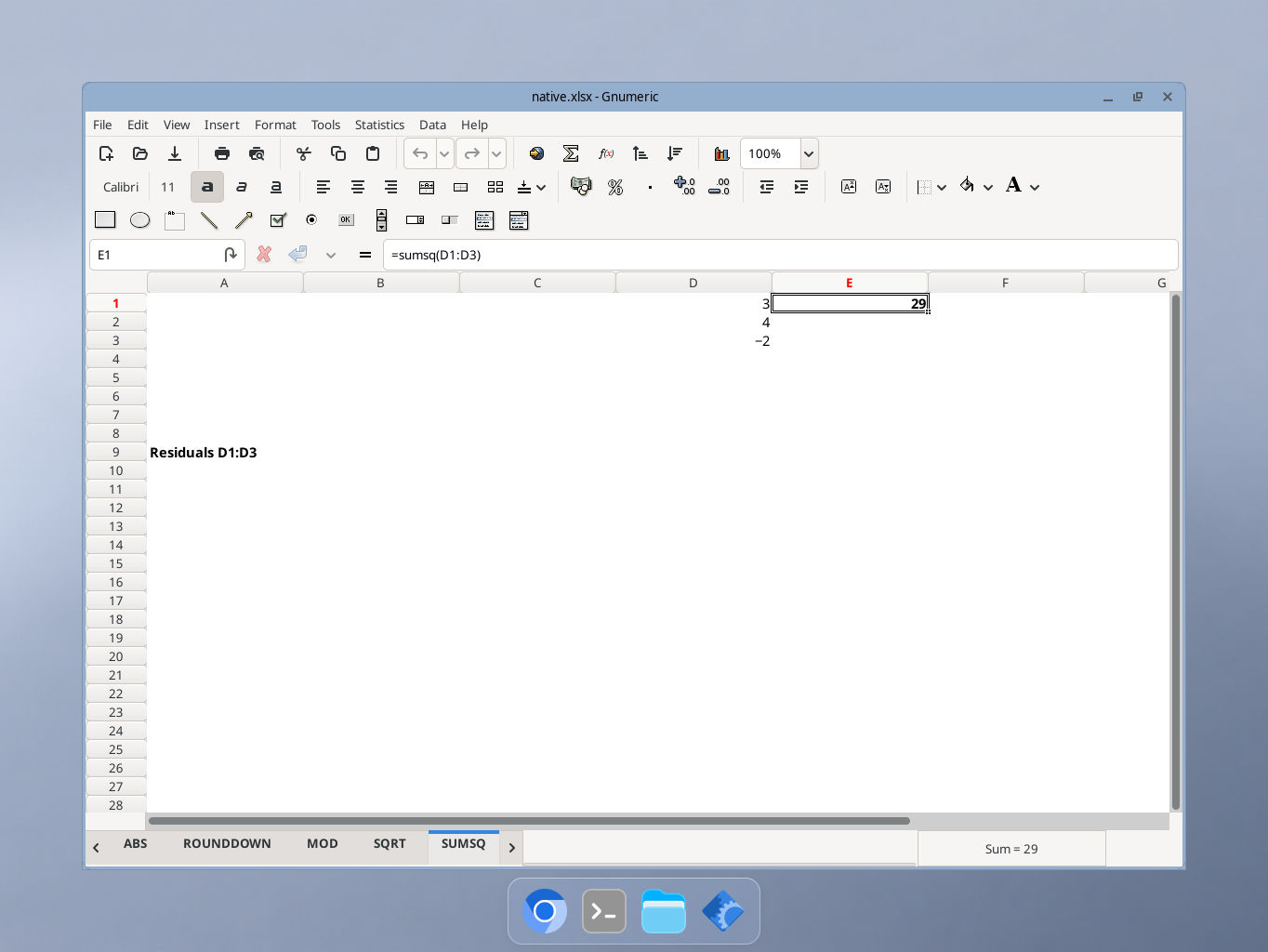
Actual Gnumeric 1.12.57 application, captured 17 October 2026. GUI locale was not independently recorded.